


Passport OCR
Doxis Passport OCR is an AI-powered scanner that automatically extracts and verifies passport data. Available via API & SDK
Trusted by 1000+ brands worldwide







Enjoy the Benefits of OCR Passport Scanner
Our identity card OCR technology uses AI to instantly capture and validate data from government-issued IDs. This digital transformation replaces slow manual checks with a high-speed process that prioritizes both security and efficiency.
Reduce Cost
Automate document processing with Doxis’ OCR for passports to reduce operational costs.
Improve Speed
Extract data from passports to simplify and speed-up KYC and onboarding.
Prevent Fraud
Detect fraud attempts, duplicates, and errors in an instant with Doxis’ AI algorithms.
Minimize Errors
Prevent errors caused by manual data entry with precise OCR passport scanner.
Unlock Passport OCR Functionalities
Leverage Doxis’ OCR Passport extraction to reduce operational costs. Process larger volumes of documents faster and easily scale-up with Doxis’ OCR passport reader.
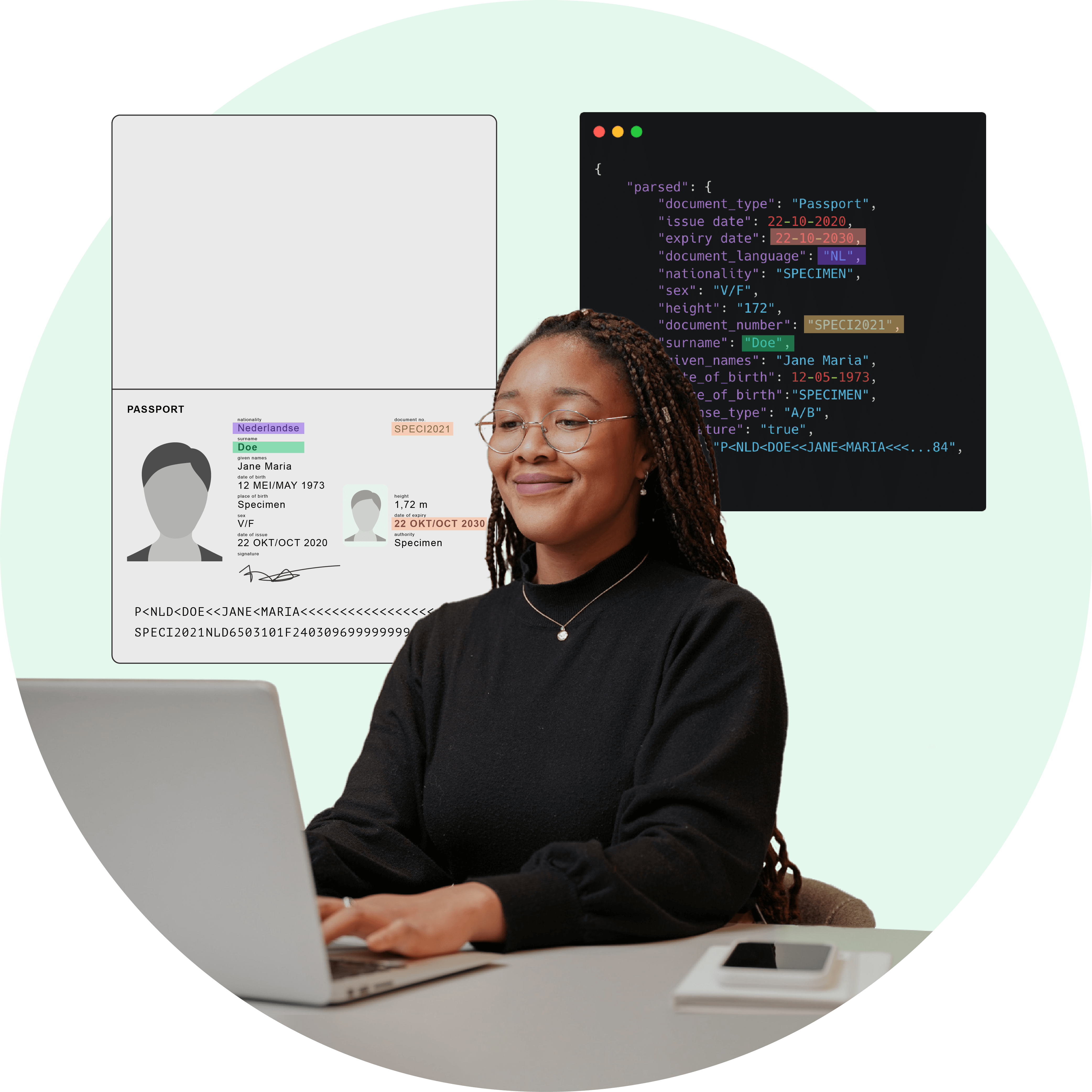
Streamline Processing withPassport OCR
Leverage high-speed Optical Character Recognition to instantly turn passport images into structured, digital data.
Go Beyond Passport Data Extractionwith Doxis AI.dp
AI.dp elevates your document processing by combining high-speed extraction with advanced fraud detection and regulatory compliance tools.
BRANDS WE HELP
Join 1000+ Other Brands in Automating Your Workflows
Discover how leading brands use Doxis AI.dp to automate, optimize, and scale their document workflows.
Passport OCR in 3 Steps
Stay at the forefront of document processing by effortlessly integrating our Passport OCR via API or SDK. Discover how Doxis’ OCR software extracts data from passports in three simple steps.
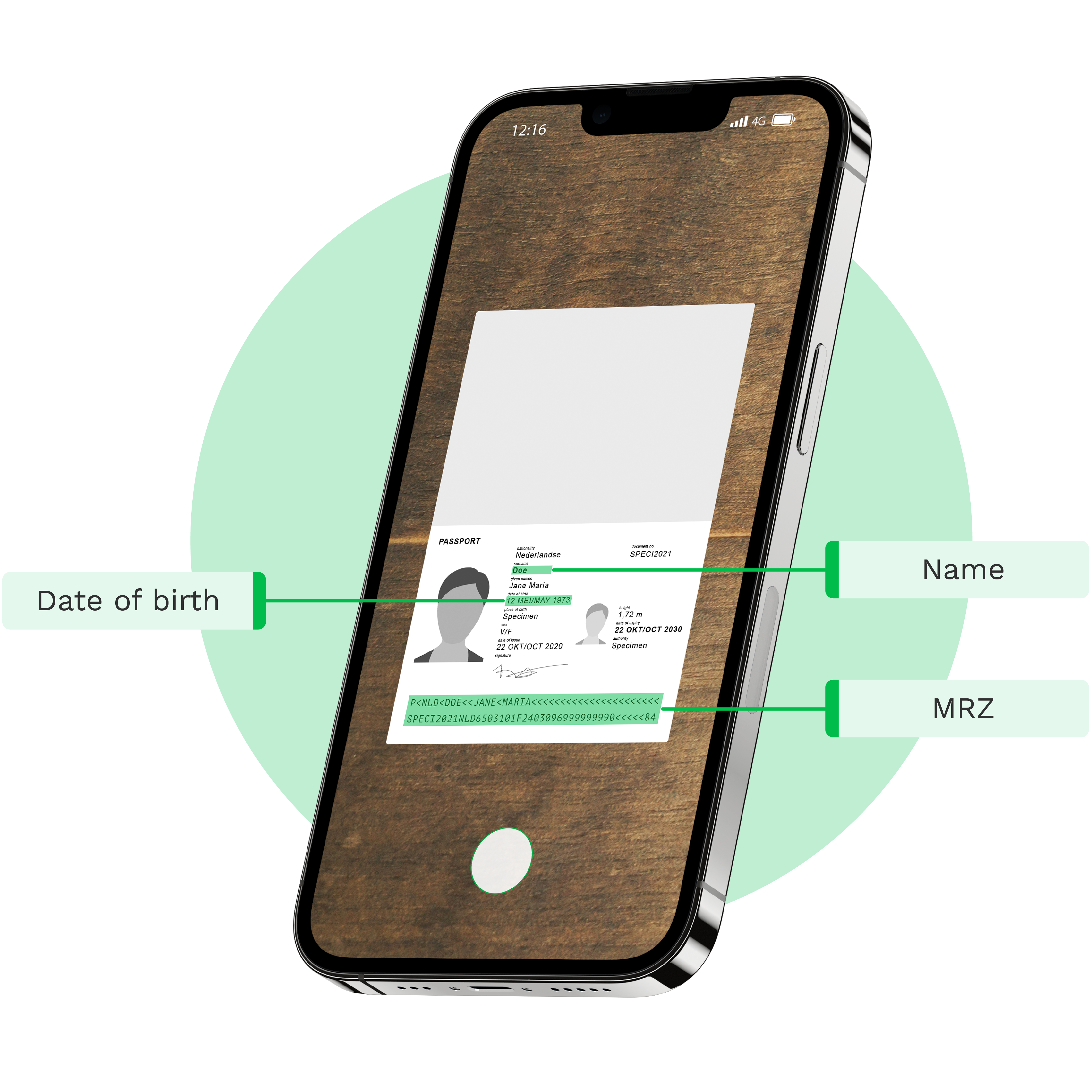
Scan passports with a scanner SDK or upload them through our Passport OCR API
The first step is sending a passport file to our API. We support formats such as
.jpg, .jpeg, .png, .pdf, .doc, .docx, .xlsx, .heic, .webp and more. Usually, this is done from a mobile app, email, FTP, or web application.The image can be sent either cropped (without a background) or uncropped (with a background). If you send the document uncropped, our API will automatically crop the document.
To optimize the image quality, use our scanner SDK.
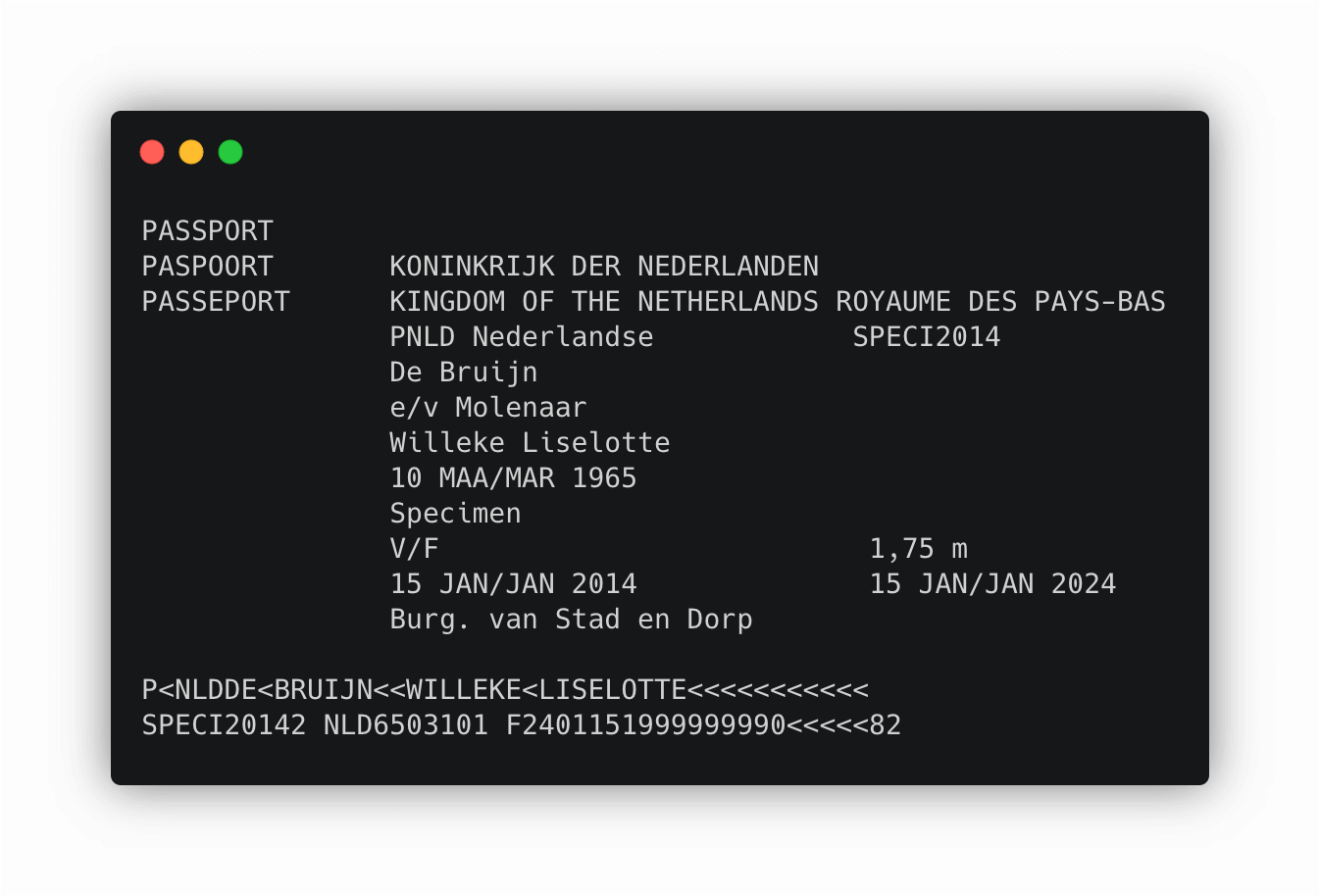
Transform image to TXT with OCR Passport Engine
As soon as the document has been received, it is converted to a TXT file by our OCR passport reader. At this step, all the data from the passport is extracted into a text format, but not yet structured.
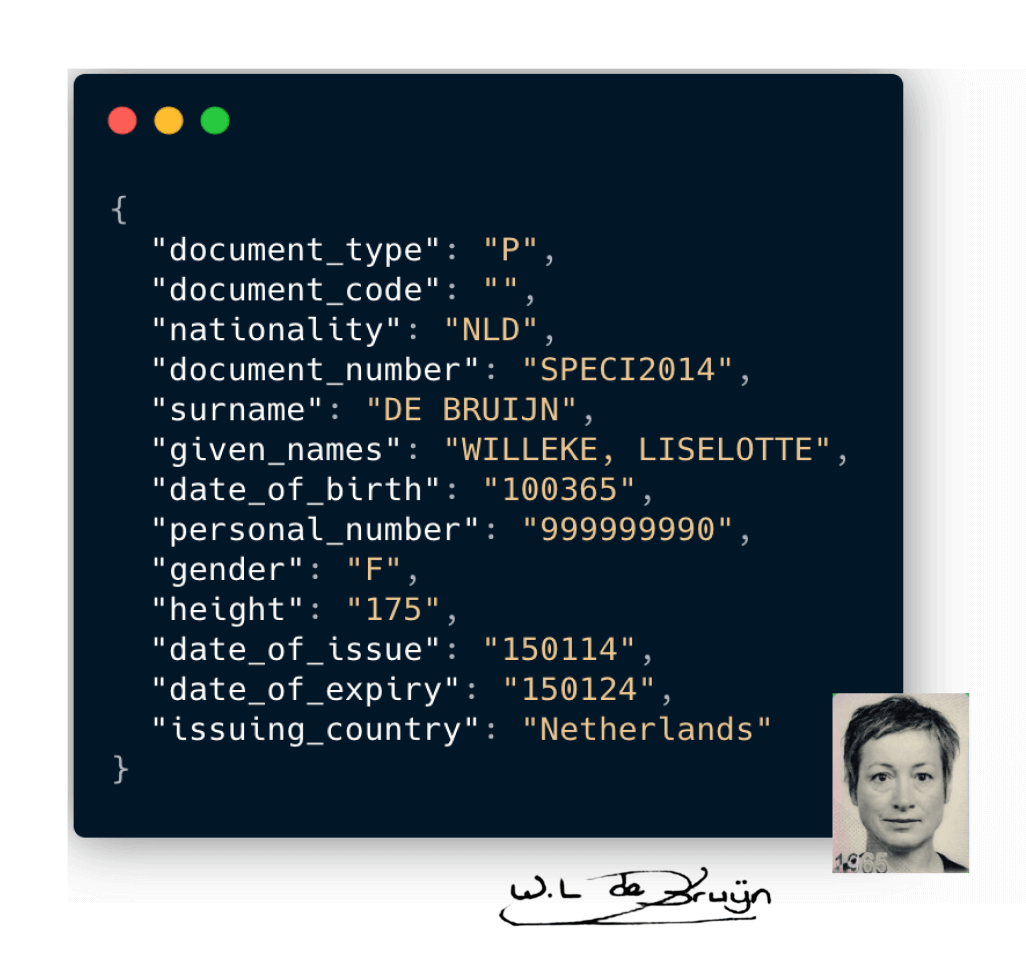
Receive JSON output from the OCR Passport API
As the final step, the Doxis Parser takes the TXT which was gained from the previous step and converts it into structured JSON. The JSON is then returned as output from the Passport OCR API.
From this point on, the passport can easily be processed in the database of your company. An extra option is to extract additional data like the signature or the passport picture.
Do you want to test our solution for free?










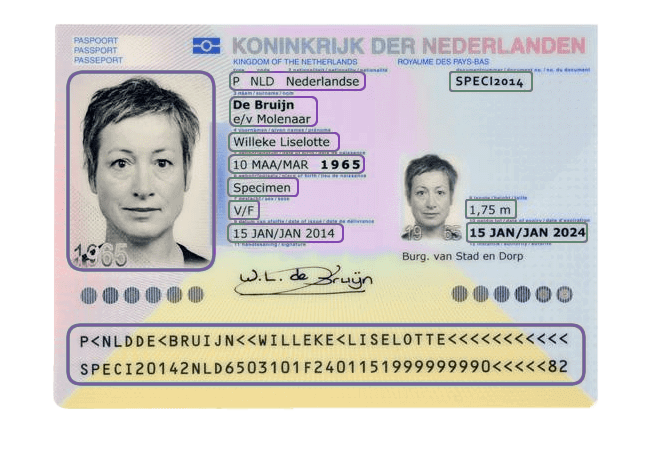
Which Data Fields Can Be Identified with Doxis’ Passport OCR?
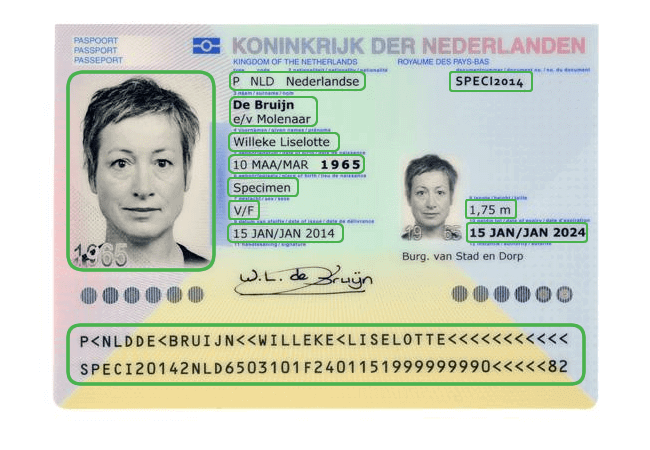
Below are the examples of data fields that can be extracted with OCR passport reader. The number of fields is fully customizable. Need additional passport OCR fields? Just ask!
How Real Estate Software Alasco Automates Invoice Workflows
“For us, it is outstanding that the OCR integration is seamless, so our customers don’t see that they are actually using another tool.”
What Alasco achieves with Doxis’ OCR:
Implement Passport OCR in Your Workflow
Doxis provides easy integration via our platform, API, or SDK, and broad compatibility with major platforms and tools. Our well-documented solutions guarantee a hassle-free and smooth experience.
Low-Code Platform
Easily create & automate your entire document workflow on one IDP platform.
API Integration
Connect our document modules to your own application(s) via API.
Mobile Scanning SDK
Employ our SDKs to empower your mobile applications with smart scanning.
- ✓ Secure

- ✓ Compliant
- ✓ Protected
- ✓ Hosted in EU
- ✓ Trusted



Frequently Asked Questions
What is Passport OCR software?
Which passport fields can be extracted automatically?
Does Passport OCR work with passports from all countries?
Does Passport OCR work on mobile devices?
Can Doxis process multiple passports at once?
Can Passport OCR integrate with KYC or onboarding systems?
Is Passport OCR secure for sensitive personal data?
How accurate is Passport OCR?
Which industries use Passport OCR most?
How much does Passport OCR software cost?
We Support a Wide Range of Identity Documents
With our solutions, you can automatically extract and validate data from many different ID documents. Do you have a special request? Don’t hesitate to contact our team.
OUR BLOG
Discover Our Insightful Articles
Explore our step‑by‑step blogs on streamlining document processing with the AI.dp Platform.