


Klippa is now Doxis - Find out more
AI-Powered Receipt OCR Software
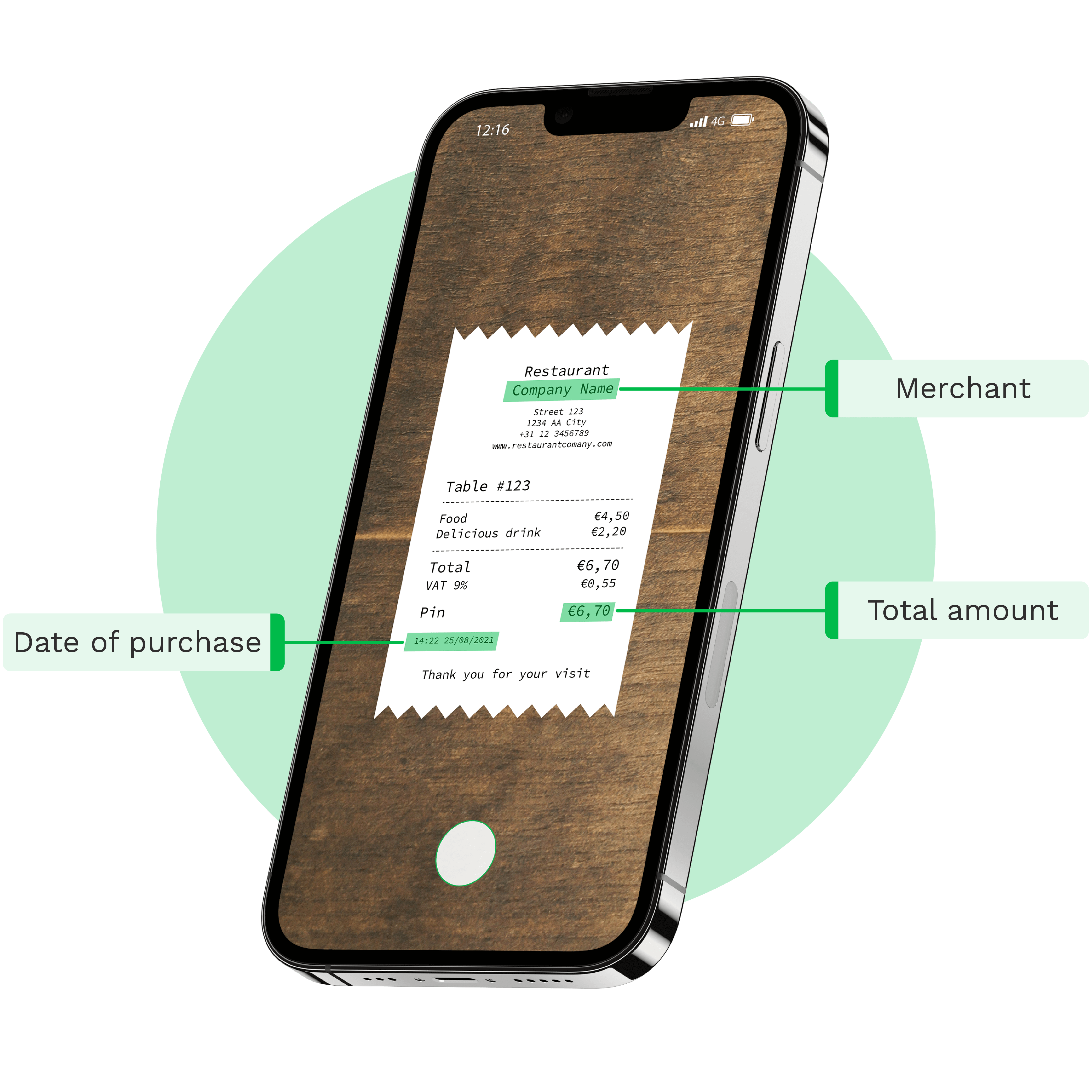
With Doxis’ Receipt OCR, you can extract detailed receipt data, including line items, from over 100 countries, and convert it into structured formats like JSON, CSV, XML, and more. Available via API & SDK.
Trusted by 1000+ brands worldwide







BENEFITS
Faster, Smarter, and Error-Free Receipt Processing Workflows With Doxis
With Doxis’ AI-powered receipt OCR, you can automatically extract key data, streamlining processes like receipt clearing, expense management, and loyalty campaigns.
Save time and money
Process receipts 75% faster and cut manual data entry to seconds, reducing your costs.
Streamline receipt workflows
Process various receipts with AI-powered OCR; automate data capture, validation, and clearing.
Reduce data entry errors
Achieve 99% accuracy with automated data extraction, eliminating costly data entry errors.
Connect with your favourite tools
Easily integrate Doxis with your ERP, accounting, CRM, or cloud systems for a seamless workflow.
- ✓ Secure

- ✓ Compliant
- ✓ Protected
- ✓ Hosted in EU
- ✓ Trusted


How it works
How Our Receipt OCR API Works in 4 Simple Steps
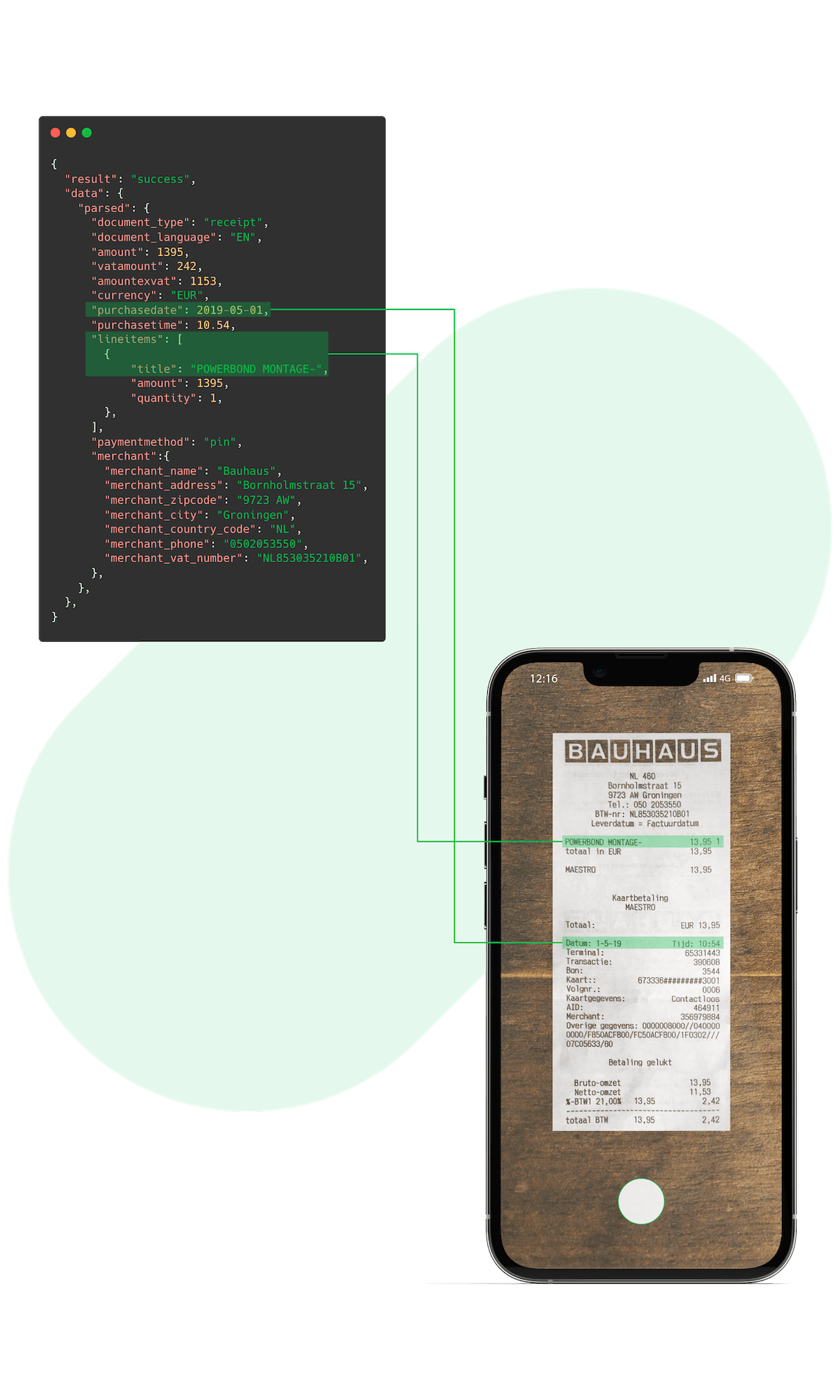
Seamless document upload
Upload receipt images or PDFs via email attachments, FTP, mobile, or web, and our OCR takes care of the rest.
Supported formats include:
.jpg, .jpeg, .png, .pdf, .doc, .docx, .xlsx, .heic, .webp, and more.Receipt data extraction
Our advanced AI-powered OCR analyzes and extracts data from documents without relying on templates.
Data validation
Our AI-powered engine validates data and flags any missing or potentially fraudulent information, enabling you to enhance data accuracy and authenticity.
Data export
Forward structured data to your CRM, ERP, accounting systems or directly to your database with the
.json response.CUSTOMER REVIEWS
What They Say About Us
Doxis AI.dp earns a 4.8/5 rating from verified users on Capterra.
Curious How We Can Help You? Get in Touch With Us Today.

LIVE DEMO
Try It Yourself
Put Doxis’ Receipt OCR API to the test with one of the sample documents or upload one of your own receipts in JPG, PNG, or PDF format.
BRANDS WE HELP
Join 1000+ Other Brands in Automating Your Workflows
Discover how leading brands use Doxis’ OCR to automate, optimize, and scale their document workflows.
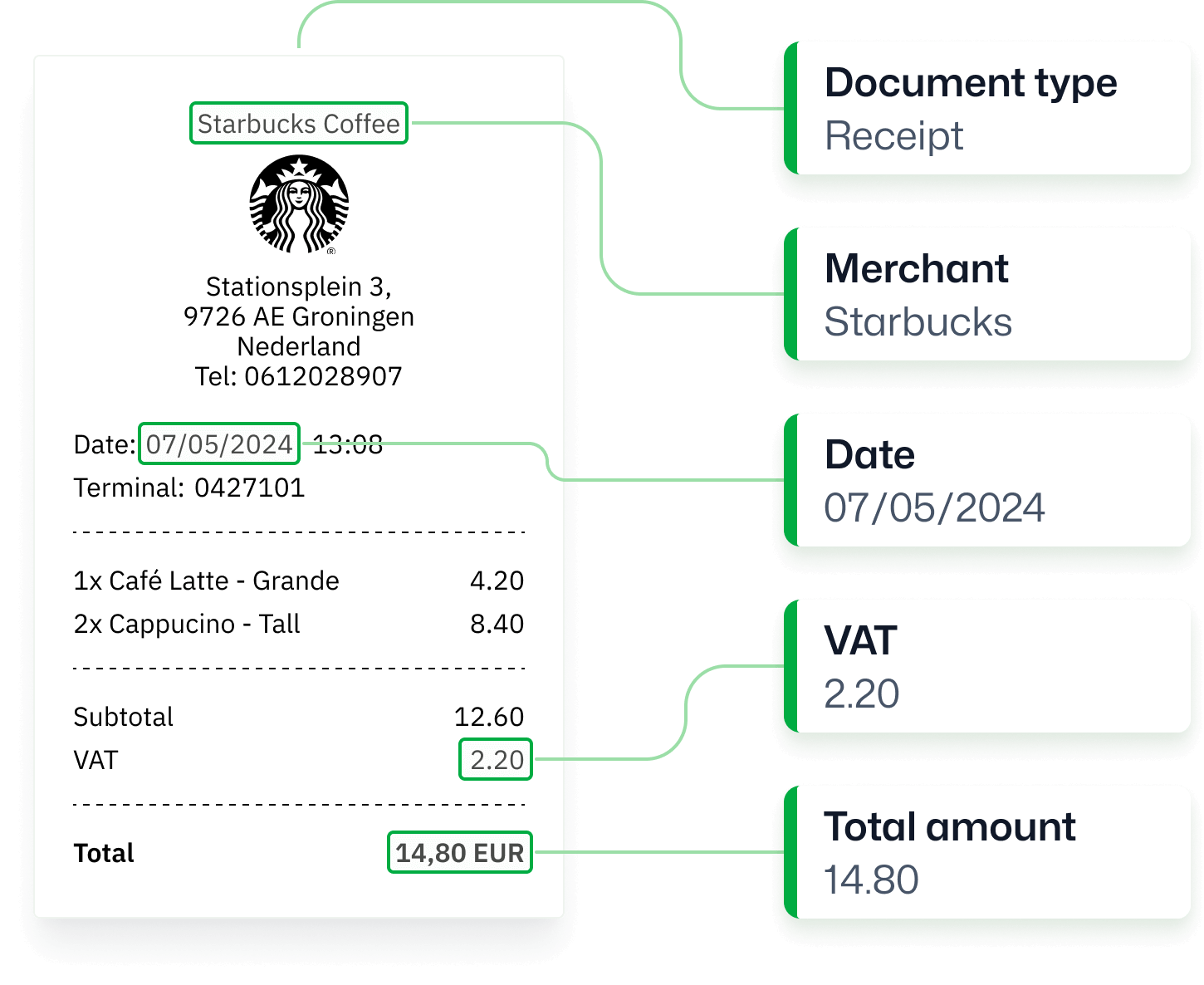
What is Receipt OCR?
Receipt OCR or receipt data extraction software is an advanced technology designed for text recognition and automated data extraction from receipts. With Doxis’ Receipt OCR, you can capture key information such as dates, total amount, and line items, and store them in structured formats like CSV or JSON.
KEY FEATURES
Get Receipt Data Extracted With OCR in Seconds
Doxis’ AI-powered OCR automates receipt scanning and clearing with advanced features, delivering quick and precise receipt data swiftly.
Fast data extraction
Our AI-powered OCR processes receipts in 0.5 to 4 seconds, depending on the uploaded file size.Receipt classification
Automatically classify receipts based on data fields such as country, language, line items, VAT, currencies, and more.Reach 99% accuracy
Experience the high accuracy of receipt OCR in text conversion, ensuring every field is captured correctly.Receipt scanning
Scan your receipts in real-time and digitize receipts easily by leveraging mobile scanning via OCR SDK.
Multi-language support
Our OCR supports various receipts in all Latin-alphabetic languages ensuring versatility and flexibility.20+ formats supported
Convert receipts to JSON, CSV, PDF, XML, XLS, XLSX, UBL, PNG, TIFF, DOC, DOCX, JPG, and many more.Workflow automation
Automate all receipt processing workflows with a single solution from receipt clearing to fraud detection.Fraud detection
Detect document fraud with smart metadata, copy-move, and grayscale analysis with built-in AI algorithms.
Data fields
Standard Receipt Data Fields You Can Extract
Do you have a custom data field request? Let’s talk!
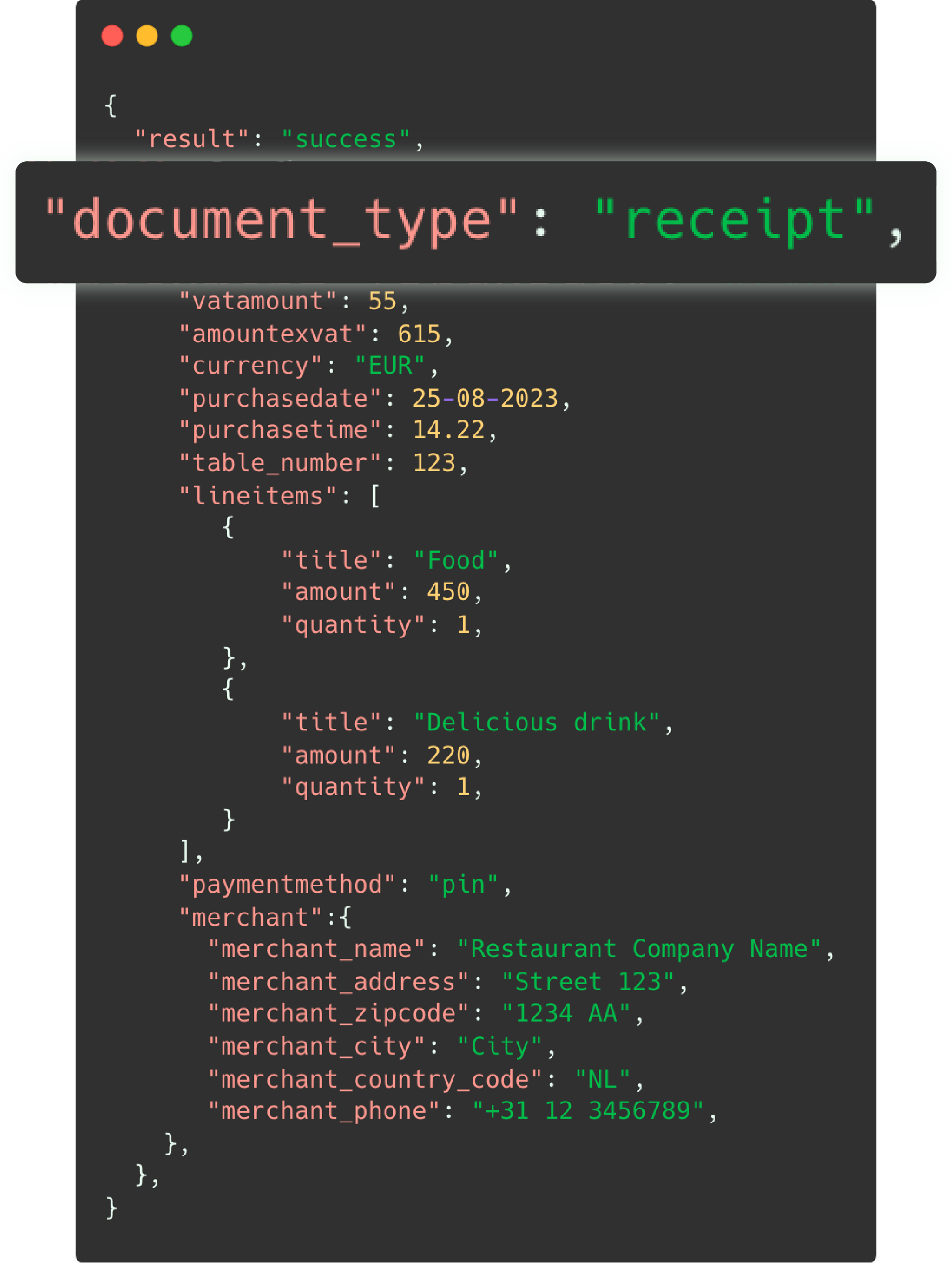
The standard Optical Character Recognition for receipt processing supports formats such as JPG, PNG and PDF as input. Our system recognizes over 30+ receipt data fields and provides a JSON as an output format. See the example fields below:
- Merchant name
- Address
- Receipt number
- Currency
- Language
- Country
- Logo
- VAT number
- Line items
- Description
- Quantity
- Unit price
- Product number
- Total amount
- Subtotal amount
- VAT %
- Transaction number
- Payment method
- Discounts
- …and many more fields!
USE CASES
Receipt Workflows You Can Automate
With the AI.dp Platform, you can automate key workflows involving receipts. Don’t see your use case listed? Our solution is fully customizable to fit your processing needs.
Frequently Asked Questions
How much does Doxis’ Receipt OCR API cost?
Which languages are supported by Doxis?
Does Receipt OCR work on low-quality images?
Can Receipt OCR extract line-item details?
Can I integrate with accounting or ERP systems?
How can I integrate Doxis’ Receipt OCR?
What formats are supported by Doxis?
What are the common Receipt OCR use cases?
How accurate is Receipt OCR?
Can Doxis detect duplicate receipts?
We Support a Wide Range of Financial Documents
With Doxis, you can automatically extract and validate data from 20+ financial document types in all Latin languages. Do you have a special request? Don’t hesitate to contact our team.
Discover Related Blogs
Explore our insightful blogs on how to automate OCR receipt processing workflows with Doxis AI.dp.