


Purchase Order OCR
Automatically extract data from purchase orders to optimize your procurement and financial workflows. No more paperwork.
Trusted by 1000+ brands worldwide




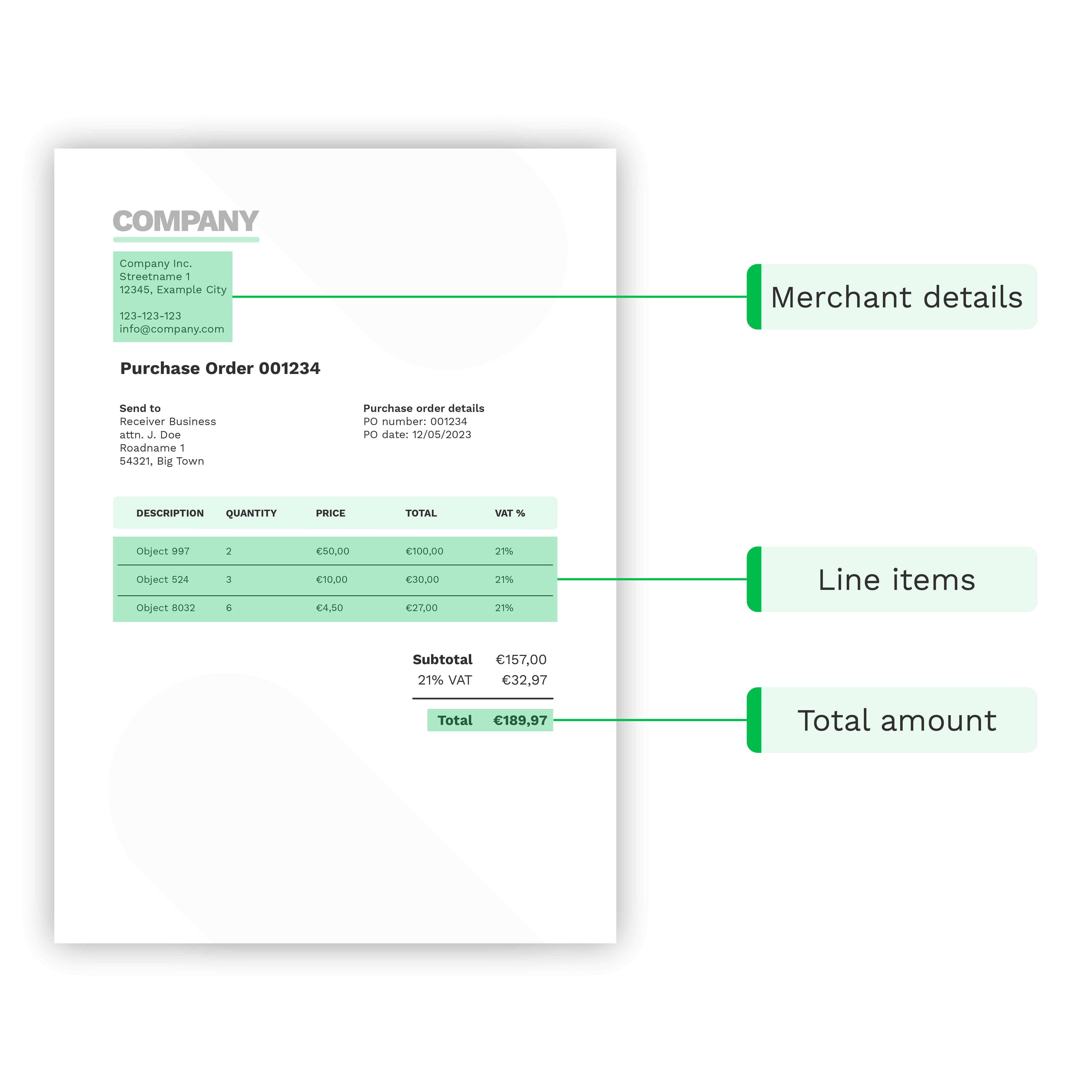
What is Purchase Order OCR?
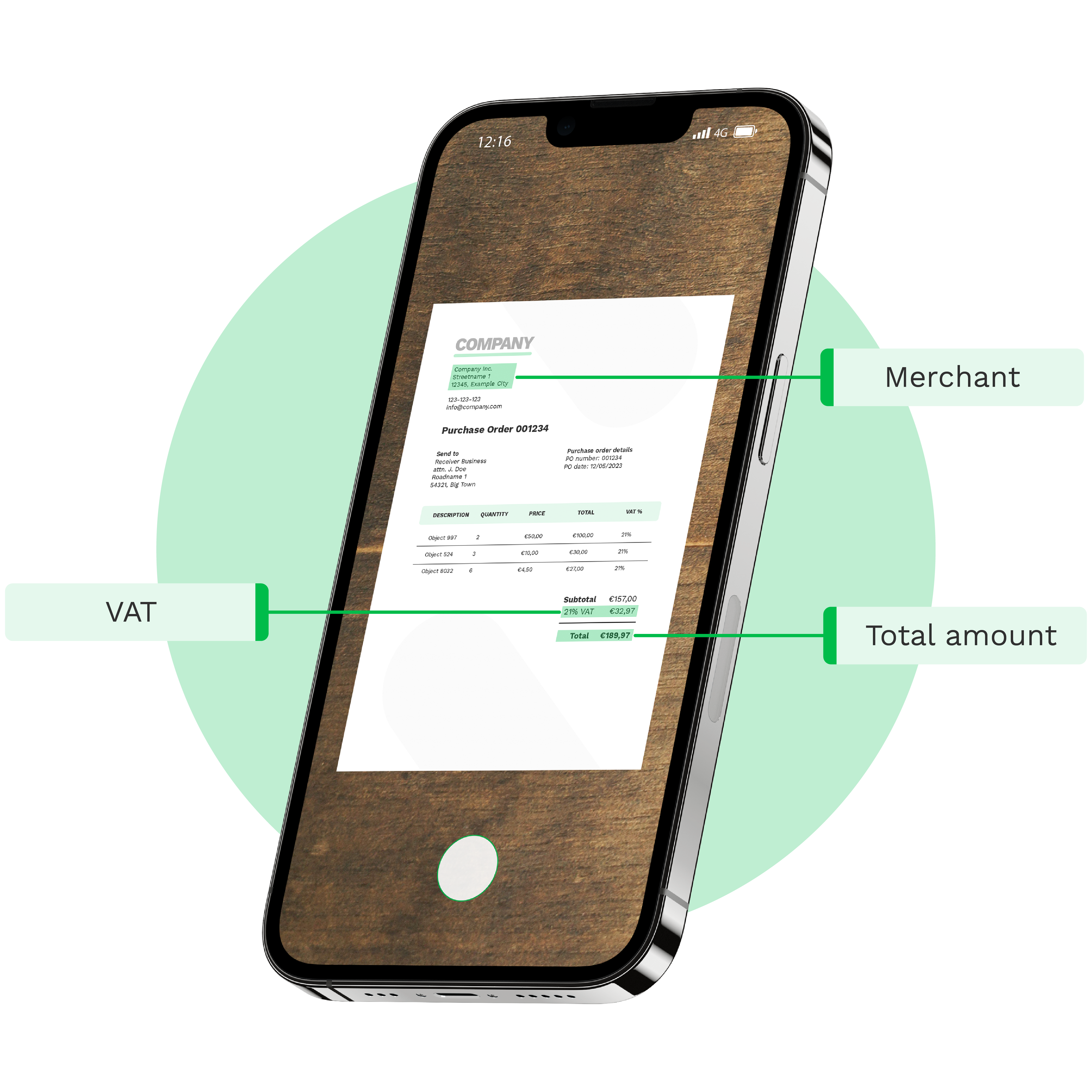
Purchase Order OCR is an advanced technology created for text recognition and data extraction from purchase orders. With Doxis’ AI-powered Purchase Order OCR you can automatically capture, extract, verify, and forward PO data using 50+ integration options, including our API and SDK.
BENEFITS
Faster, Smarter, and Error-Free PO Workflows With Doxis
It’s simple – with Doxis AI-powered purchase order OCR, you can automate any PO workflow, allowing you to focus on your core business without wasting time on data entry tasks.
Save time and money
Process PO 75% faster and cut manual data entry to seconds, reducing your operational costs.
Streamline PO workflows
Process various PO formats with OCR and AI, automating data capture, validation, and matching.
Reduce data entry errors
Achieve 99% accuracy with automated data extraction, eliminating costly data entry errors.
Connect with your favourite tools
Easily integrate Doxis with your ERP, accounting, CRM, or cloud systems for a seamless workflow.
BRANDS WE HELP
Join 1000+ Other Brands in Automating Your Workflows
Discover how leading brands use Doxis’ OCR to automate, optimize, and scale their document workflows.
How it works
Purchase Order Processing Made Quick and Easy
Automate PO workflows in just a few simple steps to scale your operations. Capture, convert, and forward extracted data without manual intervention.

Send Your Purchase Orders
Scan your POs with our mobile scanning SDK or forward them to our platform in any of these formats:
.jpg, .jpeg, .png, .pdf, .doc, .docx, .xlsx, .heic, .webp, and more. You can connect various cloud drives, mailboxes, or establish FTP connection.Extract Data
Select which data fields you want to extract, such as merchant’s details, PO number, and line items to name a few. If you wish to, you can also connect our fraud detection module or two/three-way matching.
Receive Formatted Output
Need to integrate your data into a specific business software? Simply choose to convert the data from your purchase orders into any structured format — JSON, XML, CSV, you name it.
Forward Your Data
After transforming your PO data into the format of your choice, it’s time to forward it. Connect your preferred business software or application to the platform for automated forwarding and integration.



Extraction fields
Extract Any Data Field from Purchase Orders
You have complete freedom over your data extraction and can define what data fields need to be extracted. Want to extract specific fields to cross-verify POs with invoices? You can do it too!
Examples of what can be identified & extracted:
Do you have a custom data field request? Let’s talk!
Doxis AI.dp
Doxis’ Purchase Order OCR Features
Doxis AI.dp is an Intelligent Document Processing (IDP) platform that goes beyond Purchase Order OCR. Here’s a glimpse of what other processes you can automate.
Purchase order scanning
Cross-verification of PO data
Format conversion to structured data
Custom extraction with prompt builder
Email parsing of incoming POs
USE CASES
Purchase Order Workflows You Can Automate
With the AI.dp Platform, you can automate key workflows involving purchase orders. Don’t see your use case listed? Our solution is fully customizable to fit your processing needs.
- ✓ Secure

- ✓ Compliant
- ✓ Protected
- ✓ Hosted in EU
- ✓ Trusted
How to Implement
Make OCR for Purchase Orders a Part of Your Workflow
Doxis provides easy integration via our platform, API, or SDK, and broad compatibility with major platforms and tools. Our well-documented solutions guarantee a hassle-free and smooth experience.
Low-Code Platform
Easily create & automate your PO workflows on one IDP platform.
Purchase Order OCR API
Connect our Purchase Order OCR to your own application(s) via API.
PO Scanning SDK
Employ our PO scanning SDK for high-quality data capture on the go.
Frequently Asked Questions
What is purchase order OCR software?
Which fields can purchase order OCR capture automatically?
Does purchase order OCR work with PDF, images, or scanned documents?
Is purchase order OCR compliant for sensitive financial data?
Can purchase order OCR handle large volumes quickly?
Can purchase orders be converted into XML, CSV, or JSON formats?
Can purchase order OCR integrate with ERP or accounting systems?
Does purchase order OCR work for multilingual documents?
What industries benefit most from purchase order OCR?
How much does purchase order OCR cost?
We Support a Wide Range of Financial Documents
With Doxis, you can automatically extract and validate data from 20+ financial document types in all Latin languages. Do you have a special request? Don’t hesitate to contact our team.
Discover Related Blogs
Explore our insightful blogs on how to automate invoice processing workflows with Doxis AI.dp.