

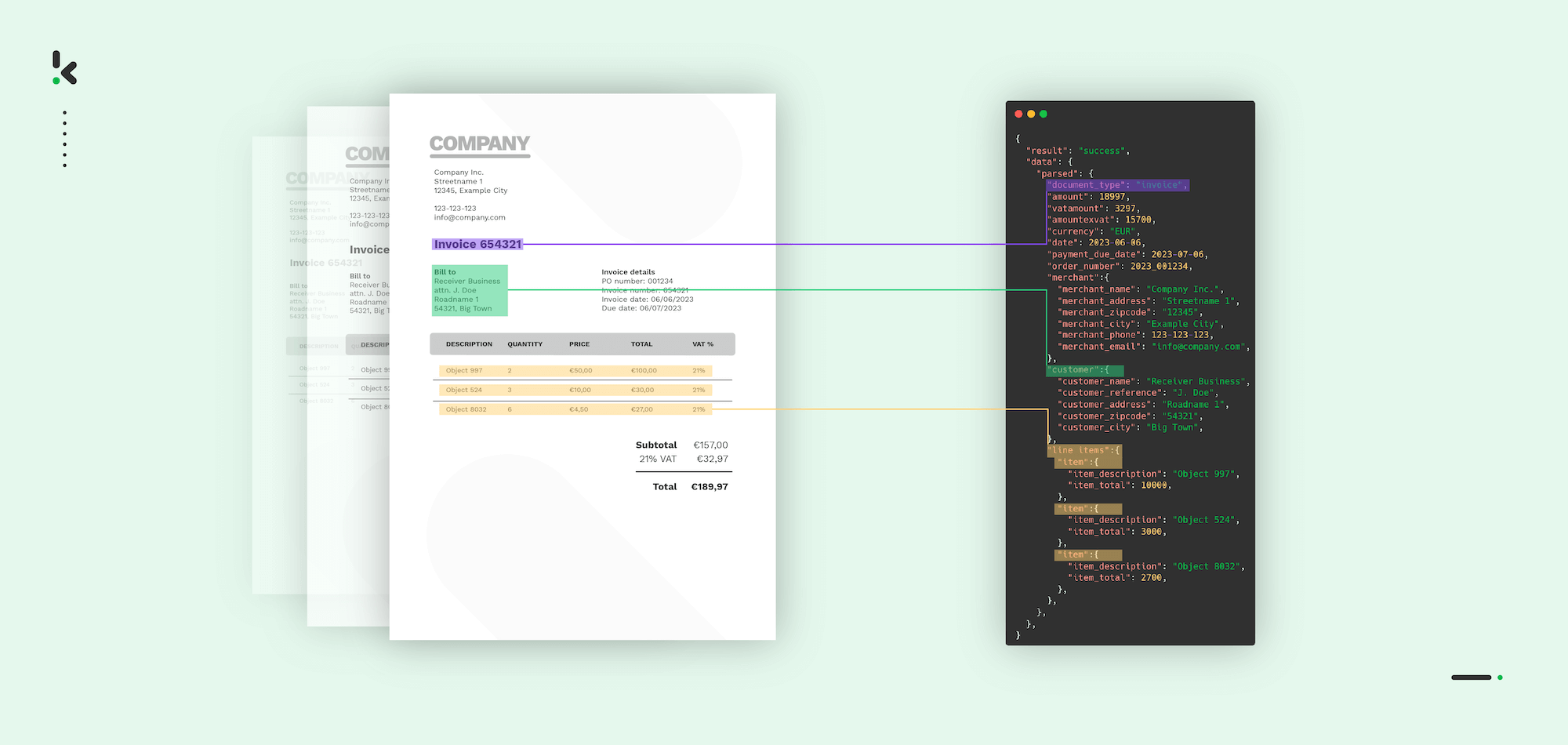
Every business runs on documents. Invoices, contracts, purchase orders, receipts: they pile up fast, and processing them manually is slow, expensive, and riddled with errors.
Most teams know this pain well: someone has to open every document, read it, and retype the data into a system that should already have it.
According to McKinsey Global Institute, US companies collectively spend $5.3 billion annually on wages for data-entry keyers alone, and that figure doesn’t account for the cost of errors, corrections, and lost productivity tied to manual document handling.
Scan and recognize technology changes that. This guide walks you through what it is, how it works step by step, and how to connect it to the software your business already uses.
Key Takeaways
- Scan and recognize is the process of digitizing physical or digital documents and automatically extracting their data using OCR, AI, and machine learning
- The process covers five stages: capture, image preprocessing, text recognition, data extraction and classification, and validation and export
- Key technologies include OCR, NLP, and machine learning, each playing a distinct role in turning a scanned image into structured, usable data
- Scan and recognize software integrates with ERP systems, accounting platforms, and other business software via API, reducing manual handoffs and speeding up workflows
- Choosing the right software comes down to accuracy, integration depth, document type support, and scalability
What is Scan and Recognize?
Scan and recognize, or OCR, is the automated process of digitizing a document, whether paper or digital, and extracting its content into structured, machine-readable data. It combines document scanning with intelligent character and data recognition, turning static images into actionable information without manual data entry.
In practice, this means a scanned invoice, a photographed receipt, or a PDF contract can be processed automatically: the system reads the document, identifies the relevant fields, and exports the data directly into your business systems.
How Does Scan and Recognize Work?
Five things happen between a document arriving and its data landing in your software. Here is each one.
Step 1: Document Capture
The process starts with getting the document into the system. This happens via a physical scanner, a multifunction printer, a mobile camera app, or a digital upload (PDF, image file, or email attachment).
Modern scan and recognize software accepts documents from all of these sources, giving your team full flexibility over how documents enter the system.
The quality of the capture matters. Poor lighting, skewed angles, or low resolution affect accuracy later in the pipeline. Most software addresses this automatically in the next step.
Step 2: Image Preprocessing
Before any recognition takes place, the system cleans and corrects the image. This includes straightening skewed pages (deskewing), removing noise and shadows, adjusting contrast, and cropping borders. Some software also detects and separates multiple documents within a single scan.
This step is what allows scan and recognize software to handle real-world documents like crumpled receipts, faded ink, and handwritten notes, without requiring perfect scan conditions.
Step 3: OCR and Text Recognition
Optical Character Recognition (OCR) is the engine at the core of every scan and recognition solution.
It analyzes the processed image pixel by pixel, identifies characters, words, and layout structures, and converts the visual content into machine-readable text.
Modern OCR goes well beyond basic character matching. AI-enhanced OCR handles a wide range of fonts, handwriting, multiple languages, and complex layouts, including tables, line items, and multi-column formats common in invoices and contracts.
Step 4: Data Extraction and Classification
Once the text is recognized, the system identifies which pieces of information are relevant and what they mean.
This is where AI and machine learning come in.
The software reads the text and understands context. It knows that a number near the word “Total” is likely the invoice amount, that a date next to “Due” is a payment deadline, and that a string of digits in the top-right corner is probably an invoice number.
For businesses processing many document types, this step also classifies the document itself, distinguishing an invoice from a purchase order from a delivery note, and routes it accordingly.
Step 5: Validation and Export
Before data leaves the system, it goes through a validation layer. The software checks extracted values against predefined rules: does the VAT amount add up? Does the supplier name match a known vendor? Is the date in a valid format?
Exceptions are flagged for human review, while clean documents pass through automatically.
The validated data is then exported to the destination of your choice: an ERP, an accounting platform, a spreadsheet, or a custom database, in whatever format that system requires.
Why Scan and Recognize Matters for Your Business
Manual document processing is one of the most expensive back-office habits a business can have.
Employees spend hours every week rekeying data that a machine could extract in seconds. According to Deloitte (2022), organizations that implement intelligent automation achieve an average cost reduction of 31% over three years.
Speed matters too.
When invoices are processed the same day they arrive, your finance team has a real-time picture of what’s owed, what’s paid, and what needs attention. That visibility directly improves cash flow management and supplier relationships.
Scan and recognize also changes how document processing scales. Manual processing grows with headcount. Automated processing grows with software, handling ten times the document volume at the same operational cost.
Key Technologies Behind Scan and Recognize
Three technologies do the actual work in scan and recognize software. Knowing what each one does helps you ask the right questions when evaluating vendors.
Optical Character Recognition (OCR)
It converts scanned images into text. Basic OCR has existed for decades, but modern AI-powered OCR reaches up to 99% field-level accuracy on structured documents, handling degraded scans, handwriting, and non-standard fonts that older engines would fail on.
Natural Language Processing (NLP)
Where OCR reads characters, NLP understands language. It identifies entities (names, dates, amounts), interprets context, and enables the system to work across document types without manual template configuration for each new format.
The line item extraction of Doxis relies on NLP to filter out non-essential text while pinpointing critical data points such as product descriptions, prices, VAT, and payment details.
Machine Learning (ML)
Models trained on large document datasets classify documents, predict field locations, and improve accuracy on new formats they haven’t seen before. When the system encounters a document type outside its training data, ML allows it to generalize rather than fail.
Together, these three layers form what is called Intelligent Document Processing (IDP): a system that doesn’t just scan and read, but genuinely understands the documents it processes.
Common Use Cases for Scan and Recognize
Scan and recognize applies across virtually every industry that handles documents at volume. The most common implementations include:
- Invoice processing: Automatically extracting supplier name, invoice number, line items, amounts, and due dates from invoices, then routing the data directly into accounts payable workflows. This is the single most common use case and delivers the fastest ROI.
- Receipt and expense management: Employees photograph receipts with a mobile app; the system extracts merchant, date, amount, and category, and logs the expense automatically. No manual expense reports, no lost receipts.
- Contract and legal document processing: Extracting key clauses, dates, party names, and obligations from contracts, enabling faster review and reducing the risk of missing critical terms.
- HR and onboarding documents: Processing identity documents, employment forms, and compliance paperwork automatically, reducing administrative burden on HR teams during onboarding.
- Logistics and customs documentation: Extracting data from waybills, delivery notes, and customs forms to keep shipment records accurate and up to date without manual entry at every stage.
- Purchase orders and order management: Automatically capturing PO details and matching them against supplier invoices to streamline three-way matching and reduce payment errors.
Integrating Scan and Recognize with Your ERP and Accounting Software
Extracting data from a document is only half the job. The real value comes when that data flows directly into the systems your business already runs on, automatically, the moment it’s validated.
Modern scan and recognition software connects to ERP and accounting platforms via API. This means extracted data, including invoice totals, vendor details, GL codes, and payment terms, is pushed directly into the right fields in your system of record the moment it’s validated.
Data lands where it needs to go: clean, structured, and ready to use.
Common integrations include:
- ERP systems: SAP, Microsoft Dynamics 365, and Oracle NetSuite are widely supported. Validated invoice data is posted directly as AP transactions or journal entries, matched against open purchase orders in your ERP. The integrations from Doxis run as a two-way sync, so your accounting records stay current without manual imports.
- Accounting software: Xero, QuickBooks, Exact, and AFAS connect natively. A scanned invoice arrives, gets extracted, and lands in your bookkeeping with the supplier reference, tax code, and category already filled in.
- Document management systems: Extracted metadata travels with the document into SharePoint, Google Drive, or your DMS, so every file is searchable from the moment it’s processed.
- Workflow and approval software: High-value invoices get routed to the right approver automatically. Mismatched POs get flagged before payment runs. The approval chain runs on the extracted data, with no manual handoff required.
When evaluating scan and recognition software, integration depth is one of the most important criteria.
Software that extracts data accurately but requires manual export steps puts the bottleneck back on your team. Look for native connectors to your existing stack, or a well-documented API that your IT team can build against.
How to Choose the Right Scan and Recognize Software
There are dozens of scan and recognize and intelligent document processing software vendors on the market. Here is what separates the ones worth shortlisting from the rest.
Accuracy on your document types
Overall accuracy figures are less useful than accuracy on the specific documents you process most. Ask vendors for benchmark results on invoices, receipts, or contracts, whichever matters most to your workflow.
Software that achieves 99% accuracy on printed invoices may perform significantly worse on handwritten forms or multi-language documents.
Integration with your existing stack
As covered above, native connectors to your ERP and accounting software are a major time-saver. Verify that the integration is bidirectional, where needed: exporting extracted data out and pulling validation inputs like vendor lists or GL codes back in from your systems.
Document type coverage
If you process a wide variety of document formats, choose software that handles all of them, high-volume and edge cases alike.
A solution that works well for invoices but requires manual handling for purchase orders or contracts creates a fragmented workflow.
Scalability and volume handling
Consider your current document volume and your projected growth. Cloud-based solutions scale without infrastructure changes; on-premise deployments may require capacity planning as volume increases.
Validation and exception handling
How the software handles documents it’s uncertain about matters as much as how it handles clean ones. Look for configurable confidence thresholds, clear exception queues, and easy human-in-the-loop review for flagged items.
Security and compliance
Documents contain sensitive financial, personal, or contractual data.
Confirm that the software meets the data residency and compliance requirements relevant to your industry and region, particularly if you operate in the EU under GDPR.
How Doxis Solves This
Most finance teams underestimate how much manual document handling costs them. The labor is the obvious part; the errors that compound downstream and the time spent correcting them are where the real damage adds up.
The scan and recognize software from Doxis automates the full pipeline: from document capture across any input channel, through AI-powered OCR and data extraction, to validated data delivered directly into your ERP or accounting platform. Whether you’re processing invoices, receipts, purchase orders, or identity documents, Doxis handles it accurately, at scale, and without manual intervention.
Key benefits of Doxis’ software:
- High-accuracy OCR and data extraction across document types, languages, and formats
- Direct integrations with leading ERP systems, accounting platforms, and document management software
- Configurable validation rules and approval workflows that fit your existing processes
- Mobile capture support for on-the-go receipt and document scanning
- GDPR-compliant and ISO 27001 certified data processing with full audit trails
- Fast implementation with pre-trained models for the most common document types
Request a free demo below or get in contact with one of our experts to see how Doxis can eliminate manual document handling from your workflows.
FAQ
Most modern scan and recognize software handles invoices, receipts, purchase orders, delivery notes, contracts, identity documents, and tax forms. Advanced solutions also process handwritten documents, multi-language files, and industry-specific formats such as waybills or insurance claims.
How accurate is scan and recognize software?
Accuracy depends on the software, the document type, and the scan quality. AI-powered solutions achieve 95-99% field-level accuracy on structured documents like printed invoices. Accuracy is lower for handwritten content or poor-quality scans, though modern preprocessing and ML models have narrowed this gap significantly.
Can the scan and recognize software connect to my existing accounting system?
Yes. Most leading scan and recognize platforms offer native integrations with common accounting software such as Xero, QuickBooks, Exact, and AFAS, as well as ERP systems like SAP and Microsoft Dynamics. Data extracted from documents is pushed directly into the correct fields, eliminating manual re-entry.
How long does it take to implement scan and recognize software?
Implementation time varies by complexity. For cloud-based solutions with pre-trained models and standard integrations, deployment takes anywhere from a few days to a few weeks. Custom integrations or on-premise deployments take longer, though many vendors provide pre-built connectors and onboarding support to speed up the process.
What happens if the software is uncertain about the extracted data?
Well-designed scan and recognition software flags low-confidence extractions for human review, keeping incorrect data out of your systems. You configure confidence thresholds to control how much automation happens versus how much requires human sign-off, balancing throughput against accuracy for your specific requirements.
Does scan and recognize software comply with GDPR?
Reputable vendors offer GDPR-compliant solutions, including data residency options within the EU, encrypted storage and transmission, audit logs, and configurable data retention policies. Always verify compliance certifications with your vendor before processing sensitive or personal data.