


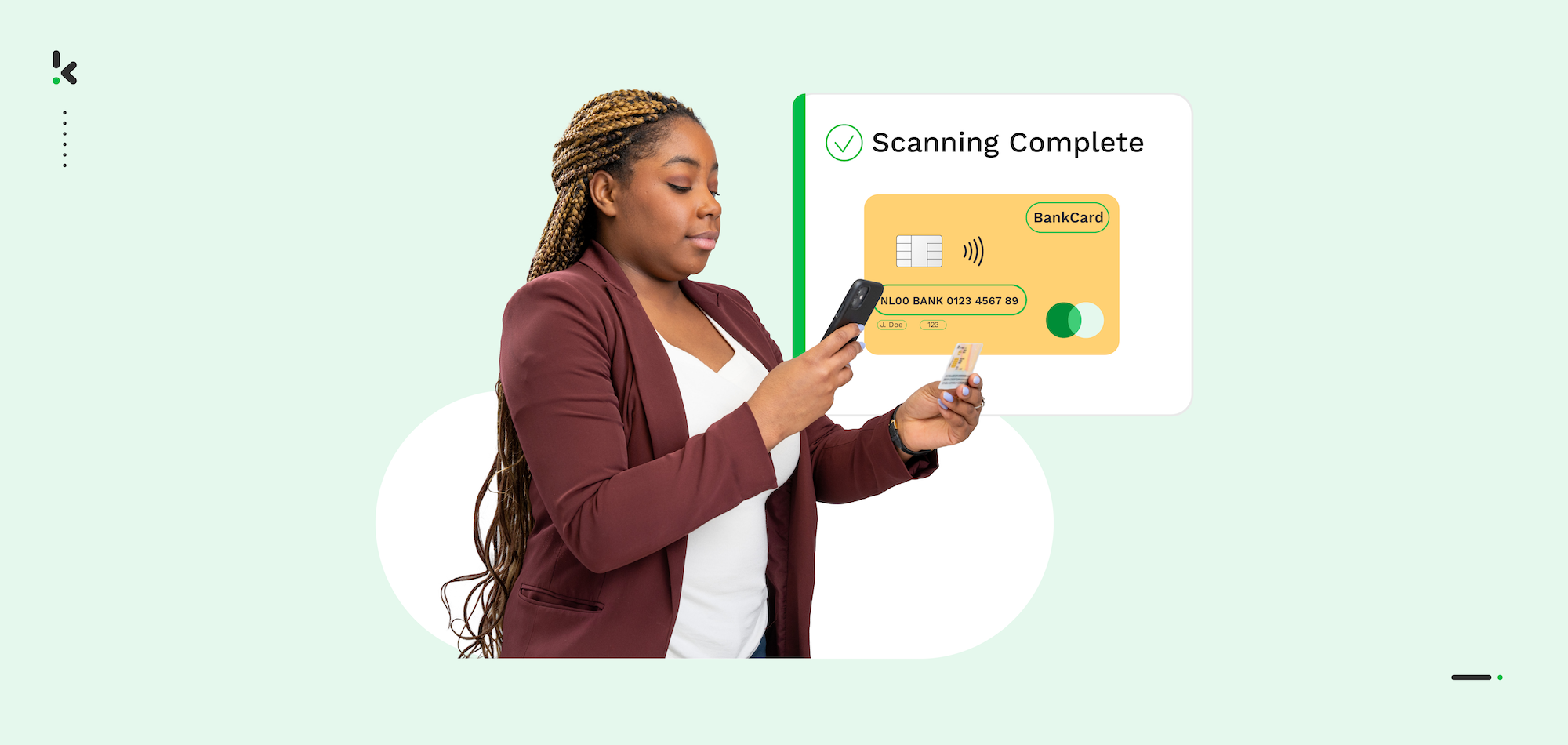
More and more companies nowadays simplify and accelerate business processes through some sort of automation. According to McKinsey’s 2024 report, “The State of AI”, AI adoption has surged globally, with 72% of organizations now using AI in some capacity – a significant leap from 50% in previous years.
Doxis’ study, “AI in the Workplace”, reinforces this trend, showcasing how automation powered by AI is transforming business processes. Many organizations report significant efficiency gains by automating repetitive tasks, freeing up employees to focus on more strategic activities and improving overall productivity.
Artificial intelligence (AI) and Machine Learning provide further fuel for market advances in automation. These technologies enable solutions to automate a growing number of business processes, from instant payment initiations to identity verification checks.
In this blog, we’ll explore how you can leverage automation to streamline five bank card-related business processes using our APIs and SDKs.
Key Takeaways
- OCR and AI automate credit & debit card scanning, instantly extracting key details like cardholder name, number, and expiry date from images or PDFs.
- Automation reduces costs and errors, eliminating manual data entry and minimizing mistakes in financial transactions and customer verification.
- AI-powered fraud detection enhances security, identifying forged cards and cross-referencing data with fraud databases in real-time.
- Easy integration with APIs and SDKs allows businesses to implement automated card scanning into their systems without complex development.
- Automating credit & debit card scanning with Doxis’ OCR cuts manual processing time by up to 75%, reduces fraud risks, and integrates in under two days.
What is Credit Card Number Scanning Software?
Credit card number scanning software uses OCR and AI to read a photo or PDF of a bank card and convert the printed or embossed details into structured data. It extracts the card number, cardholder name, expiry date, issuer, and card network in seconds, removing manual entry from payment, onboarding, and verification flows.
The same software reads debit cards, where the valuable field is the IBAN rather than the card number. It is delivered either as an API that accepts an image and returns JSON, or as an SDK that adds the capture step to your own mobile app.
Which Cards Can Be Scanned with OCR and AI?
Before we turn our attention to the business processes that can be automated, it’s good to know which bank cards can be scanned. Well, the answer to that question is relatively simple.
Doxis’ card scanning solution works basically on all sorts of bank cards containing printed or embossed texts, numbers, and logos. These elements can be read and data can be extracted from them automatically.
A smart card scanning solution is therefore extremely handy in taking over the manual process of reading and checking bank cards, and the related data entry, usually performed by clerks.
Credit cards and debit cards are the most commonly used bank cards.
1. Credit cards
Credit cards are convenient for everyday purchases and have the advantage that they are widely accepted for purchase, for example, when you travel internationally. They allow you to borrow money from the card issuer up to a certain limit in order to purchase items or withdraw cash.
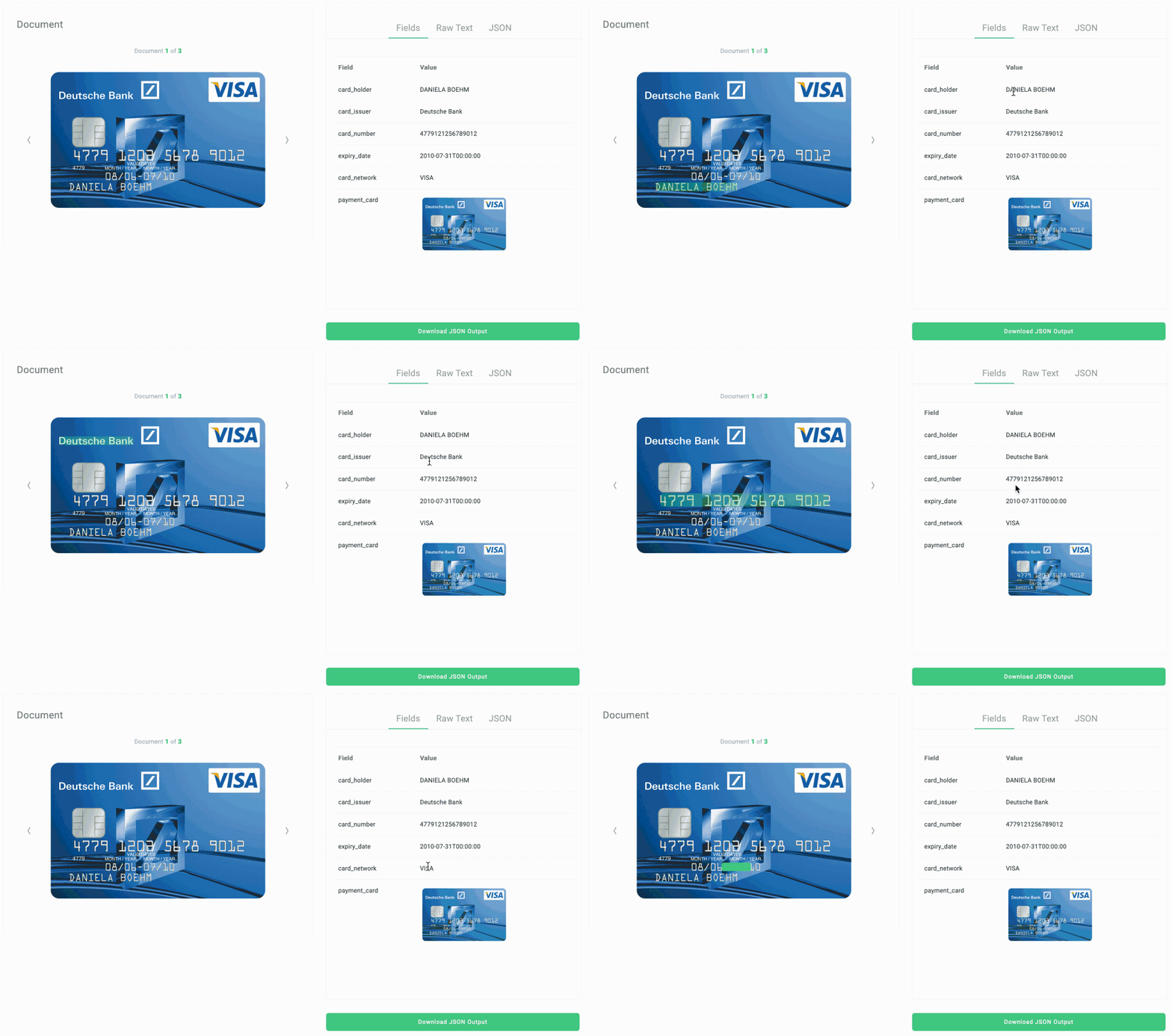
From credit cards, we can extract the following data fields:
- Card type
- Credit card processing network
- Credit card issuer
- Cardholder name
- Card number or PAN
- Expiry date
- CVC (optional)
- Signature
2. Debit cards
Debit cards are generally easier to obtain and set you on a budget, meaning you cannot spend more money than you have. They allow you to spend money by drawing on funds you have deposited at the bank.
From debit cards, we can extract the following data fields:
- Card type
- Debit card network
- Bank name
- Cardholder name
- Bank account number or IBAN
- Card number
- Expiry date
- Signature
How Does Automated Credit & Debit Card Scanning Work?
Now that we know which cards can be scanned, let’s have a look at how our solution works. It might become a bit technical from here, but we will try to explain it in layman’s terms.
Step 1: Provide a Picture or PDF of the Card
The first step in the process is providing a picture or PDF file of a debit or credit card to our API. This can be done with the mobile app by simply taking a picture with your smartphone. We will automatically remove the background and correct any rotations. It is as easy as that!
If you do not have camera functionality in your app yet, the Doxis Camera SDK might be beneficial to help with bank card scanning. This is a full-camera scanning kit that has square recognition, cropping, perspective correction, and quality detection.
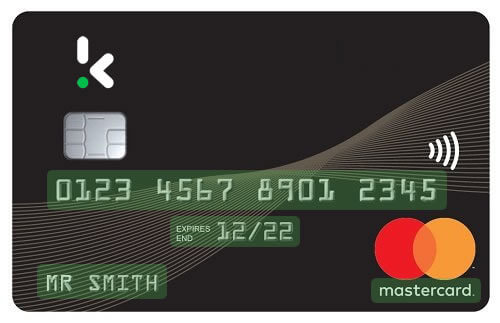
Step 2: Extract Text from the Image
As soon as the picture or PDF file has been received, the image is optimized and converted into a raw text file. In this step, all the text from the card is extracted, but it is not structured yet. You can see an example below:
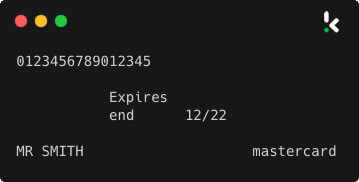
Step 3: Convert Text into Structured Data
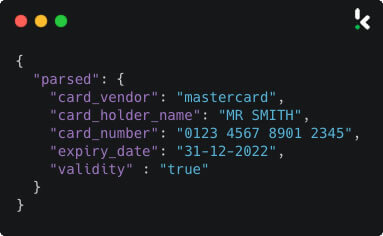
Next, the Doxis Parser takes the text file from step 2 and converts it into a structured JSON format. The JSON is then returned as output from the API.
From here, the extracted data can be used according to your own needs, such as passing it on to your database for further processing.
All of this is completed fully automatically in just a few seconds, without any human intervention. That sounds pretty nice, right?
Benefits of Automated Credit & Debit Card Scanning
Next to being fully automated without any need for manual actions, our card scanning solution has many practical benefits that can help your business move forward. We will list the most important ones below:
Reduce costs
Manually checking and processing bank cards can be quite a labor-intensive process, both for you and your customers. Just think about the manual data entry, card verification, and archiving requirements that come with it.
Our solution can save you a lot of time and thus labor costs in this process by automatically extracting data from bank cards. There’s no magic formula for this, of course, but intelligent automation typically results in cost savings of 40% to 75%, with the payback period ranging from several months to several years.
Increase speed
It only makes sense that automated processes are faster than manual processes. Take a process like credit card verification. When done manually, reviewers have to go through several documents, make sure the information is correct, and check for fraud. Humans aren’t anywhere close to being as fast as computers, and automating this process can save you a lot of time and money.
Reduce errors
Did you know that manual data entry inevitably leads to data entry errors? Error rates typically range from 0.55% to 3.6%, although error rates as high as 26.9% have been found. Typing on a smartphone isn’t the most enjoyable experience either, so these rates may be even higher for mobile devices.
Luckily, automated processes and computer programs do this substantially better. With our credit card scanning solution, you are assured of the best data extraction software for bank cards, thereby minimizing the risk of human error.
Prevent fraud
Our card scanning solution not only includes OCR technology but also contains AI-based image tampering detection. This involves detecting incoherent pixel structures, such as strange changes in lighting or sudden color changes in text. As a result, the software detects forged images in seconds, making it easier to filter out fraudulent applications before they can cause you any trouble.
In addition, our system can cross-check the information on a person’s card with external resources. If you have blacklists or fraud databases with known fraudulent cards, for example, these can be consulted automatically.
Use Cases of Automated Debit & Credit Card Scanning
We try to extract as much data as possible from debit and credit cards via OCR and machine learning. This ensures that we can support as many use cases as possible. Below you will find the most common ones:
Simplify credit card payments
Entering credit card details manually on websites can be frustrating and error-prone. With our AI-powered credit card scanner, users simply scan their cards with their phone’s camera or upload a PDF.
Using OCR and AI, fields are identified, and the data is extracted and entered automatically, streamlining the checkout process. This improves user experience, increases checkout success rates, and boosts revenues.
Digital customer onboarding with credit cards
Many online platforms require credit card information at sign-up to ensure valid and authorized use. Automating this process with OCR and AI enhances efficiency and compliance.
In industries like cryptocurrency, credit card authenticity, and cardholder details are matched with identity documents for verification.
Automated age verification via credit card scanning
For age-restricted services, credit card scanning enables identity and age checks. Methods like CVV, AVS, and 3D Secure verify card ownership, ensuring users meet the age requirements for services like alcohol, tobacco, or age-rated video games.
This is a more robust system than self-reported dates of birth.
Bank account (IBAN) validation through debit card scanning
Manually entering IBANs often leads to errors. Our software automates IBAN validation, ensuring format accuracy and verifying account ownership by matching bank cardholder details with identity documents. This reduces failed transactions and enhances accuracy.
Automatic anonymization of bank card data
Companies with large document collections can anonymize privacy-sensitive data like credit card numbers using Doxis’ OCR API.
Our solution automatically blacklines or removes sensitive details, such as the last digits of IBANs, during scans or from existing records. This transforms a tedious task into a simple, efficient process.
As such, we help businesses to speed up their bank card-related processes, stay compliant, and provide a hassle-free experience to their users.
Choosing the Right Card Scanning Solution: Build or Integrate?
With an in-house development team, building your own card scanner looks like a contained project: take a photo, run OCR, pull out sixteen digits. The first prototype confirms that, because a well-lit photo of a flat-printed Visa card is the easy case. Production is where the estimate breaks.
What Building Your Own Actually Involves
The hard parts surface after the prototype works:
- Card design variance: layouts differ by issuer, network, and country, and vertical cards put fields where your parser does not expect them
- Surface conditions: embossed numbers catch shadow, flat-printed ink is low contrast, and holograms, metallic finishes, and worn plastic each degrade recognition differently
- Training data: reliable accuracy across that range needs a large volume of real card images, which is expensive and legally awkward to collect
- PCI DSS scope: the moment your application handles a primary account number, you inherit encryption requirements, storage restrictions, and audit obligations
- Permanent maintenance: new card designs launch continuously, so accuracy is not something you achieve once and file away
Research by McKinsey and the University of Oxford across more than 5,400 IT projects found that large IT projects run 45% over budget while delivering 56% less value than predicted.
Build vs Integrate at a Glance
What Integration Looks Like
The Doxis bank card scanner integrates through a developer-friendly API or a mobile SDK, returning structured JSON you can pass straight into your database.
To give you a clearer picture, here’s an example of a simplified JSON response from our API:
And that’s just the beginning – our API is designed to be developer-friendly and easy to implement. Below, you’ll find a PHP code snippet to demonstrate how straightforward the integration process can be.
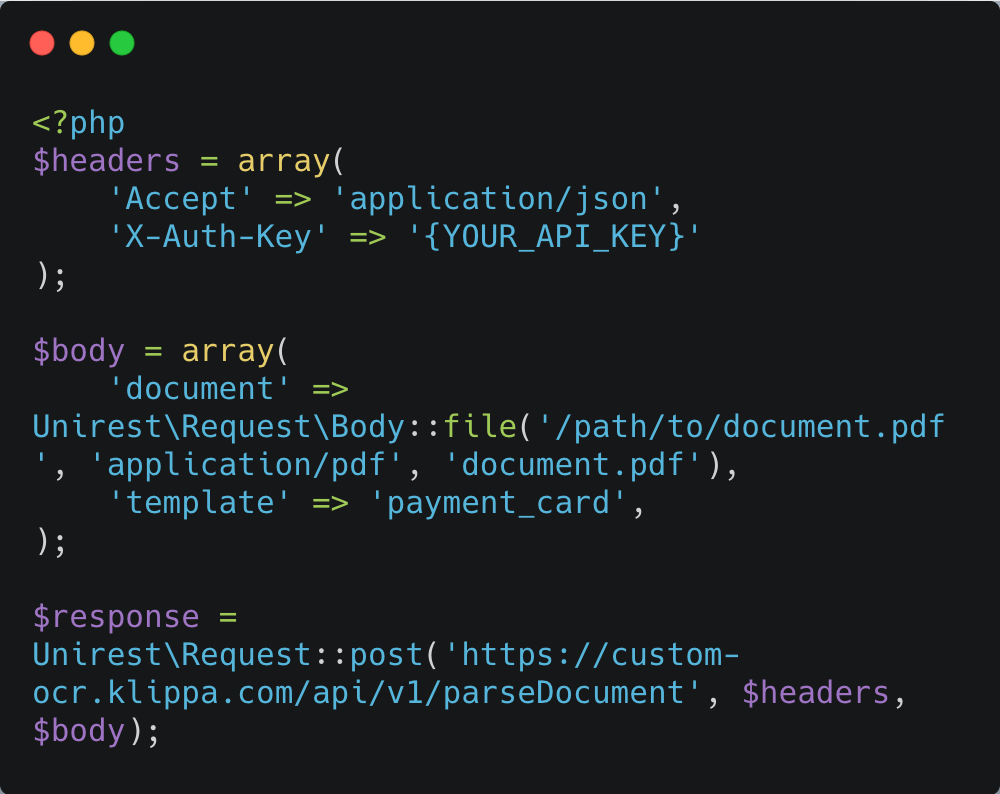
Not only is our API adaptable to different programming languages, but we also provide extensive documentation and offer dedicated business and technical support to ensure a smooth implementation.
Why Choose Doxis for Credit Card Number Scanning
If you have decided that integrating beats building, the next question is which provider to integrate. Card scanning is not a commodity: accuracy across card designs, the breadth of extracted fields, and how the vendor handles sensitive data separate a working integration from a support ticket generator.
Doxis’ card scanning software is built for that difference:
- Broad card coverage: printed and embossed credit and debit cards across issuers, networks, and countries, including worn and low-contrast designs
- Full field extraction: card number, cardholder name, expiry date, issuer, card network, CVC, signature, and IBAN on debit cards, not just the digits
- Built-in fraud detection: AI-based image tampering detection flags forged cards, with automatic cross-checks against your own blacklists and fraud databases
- Compliance handled: PCI DSS aligned processing and full GDPR compliance, with encryption in transit and at rest and automatic masking of sensitive fields
- Integration in days: a documented REST API and mobile SDKs with capture, cropping, and quality detection built in, live in under two days
- Real support: business and technical specialists who help you scope the use case and stay involved through implementation
Tell us what you are trying to automate, whether that is checkout conversion, KYC onboarding, or IBAN validation, and our product specialists will show you exactly how the software fits your stack.
FAQ
Automated bank card scanning uses AI and OCR (Optical Character Recognition) to extract key details from an image or PDF of a card. The process starts with capturing the card’s information, which is then analyzed and converted into structured data. This eliminates manual data entry, speeds up processing, and reduces errors.
2. Can AI-powered card scanning help prevent fraud?
Yes, Doxis’ solution includes AI-based image tampering detection, which spots forged documents by analyzing inconsistencies in lighting, pixel structures, and sudden text changes. It can also cross-check card details with fraud databases.
3. What security and compliance factors should businesses consider when automating bank card scanning?
Businesses should ensure that OCR solutions comply with PCI DSS standards for secure card data handling, use strong encryption during capture and storage, and avoid storing unmasked card numbers. Compliance with data protection laws such as GDPR is essential when handling customer information.
4. How can OCR and AI handle card scanning for businesses that serve customers in multiple languages and character sets?
Modern OCR systems support multilingual recognition. AI models trained on diverse language datasets ensure accurate extraction of names and numbers regardless of script or formatting, making them suitable for global operations.
5. What are the pros and cons of using cloud-based OCR tools versus installing on-premise card scanning software?
Cloud-based OCR offers rapid deployment, scalability, and minimal infrastructure management, but requires robust cybersecurity measures and compliance checks. On-premise solutions give organizations more control over their data environment but often require larger upfront investments and ongoing IT maintenance.
6. What types of bank cards can be scanned using Doxis’ OCR?
Doxis’ solution supports scanning all types of bank cards with printed or embossed text, including credit and debit cards. It extracts key data such as cardholder name, card number, expiry date, and more.
7. Can Doxis’ card scanning solution be integrated into existing systems?
Yes, Doxis provides easy-to-integrate APIs and SDKs, allowing businesses to add automated card scanning to their software with minimal development effort.
8. Is Doxis’ card scanning technology secure and compliant?
Yes. Doxis operates in compliance with PCI DSS standards for payment data security and fully meets GDPR requirements for privacy protection. All data is encrypted in transit and at rest, and sensitive information can be automatically anonymized or masked during scanning.
9. Who benefits from automated card scanning?
Industries such as financial services, fintech, e‑commerce, cryptocurrency platforms, travel booking sites, and age‑restricted services (alcohol, tobacco, gaming) use Doxis to speed up onboarding, increase checkout conversion rates, and maintain compliance.
10. How do I get started with Doxis?
You can book a free 30‑minute demo to see Doxis’ solution in action, learn how it integrates with your current systems, and get answers tailored to your business needs.