


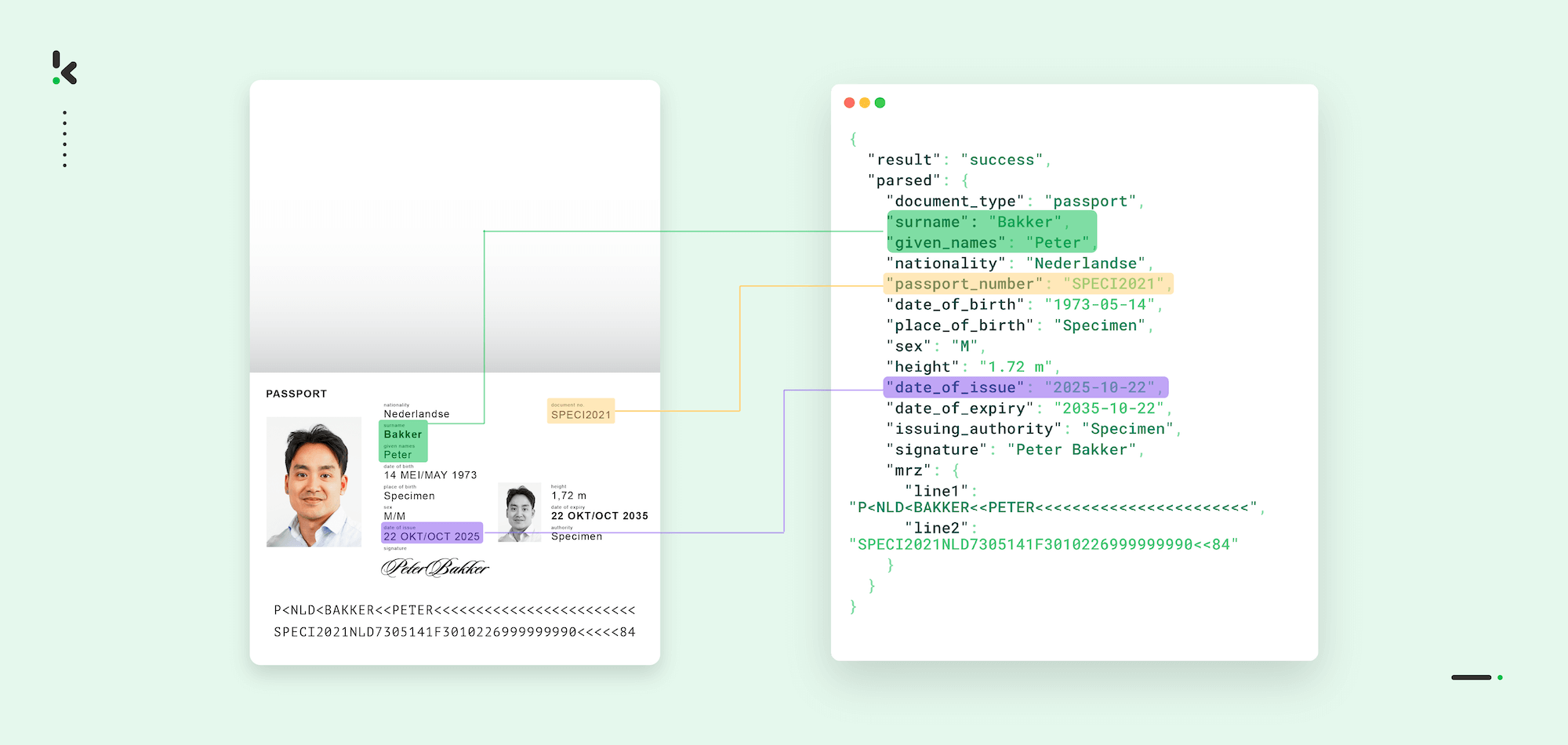
If your business regularly processes passports, whether at hotel check-ins, airport boarding gates, bank account openings, or employee onboarding, you know how slow manual data entry can be. Every minute spent typing out names, dates, and passport numbers is time not spent serving your customers. Worse yet, manual entry creates room for small errors that can quickly turn into big problems.
These mistakes are not just inconvenient. They can lead to compliance breaches, mismatched records, delayed approvals, and even reputational damage. A single wrong digit in a passport number could hinder a KYC verification, slow down travel arrangements, or trigger regulatory red flags. In industries where accuracy, speed, and security are paramount, relying on manual processes is becoming an increasing liability.
Fortunately, advancements in Optical Character Recognition (OCR) and Intelligent Document Processing (IDP) now allow you to automatically capture passport data in seconds. With AI-trained systems that can read printed text, multiple languages, and machine-readable zone (MRZ) codes, you can eliminate the need for manual typing entirely. The result is faster operations, greater accuracy, and a more seamless experience for both your customers and your team.
Key Takeaways
- Automated passport data capture uses OCR and AI to extract details like names, dates of birth, nationality, and passport numbers in seconds.
- Fraud detection features help identify tampered or forged documents before they are processed.
- Automation improves speed, accuracy, security, and regulatory compliance across industries such as travel, banking, government services, and HR onboarding.
- Integration via API or SDK allows captured data to flow directly into existing systems like CRM platforms, booking software, or KYC tools.
What is Automated Extraction of Passport Data?
Automatically extracting data from passports is the process of using OCR and AI to read and extract information from passports without manual data entry. It takes both printed text and the MRZ on the passport photo page and converts it into structured, usable data in seconds.
This technology is designed to work with passports from all countries, multiple languages, and varied layouts. AI-trained models can detect, interpret, and deliver data with high accuracy. Common fields extracted include the holder’s full name, date of birth, nationality, passport number, and expiration date.
The information captured can be validated automatically to ensure it matches regulatory and internal requirements. Once verified, it can be seamlessly integrated into systems such as CRM software, KYC verification platforms, booking tools, or HR databases. This not only saves time but also ensures compliance and security at every step.
How Passport Data Capture Works
Automated data capture from passports combines OCR technology with AI-powered Intelligent Document Processing to quickly and accurately extract information. The process typically follows these steps:
1. Image Capture
The process starts by obtaining a clear digital image of the passport. Image capture can be done using a document scanner, a mobile device camera, or a self-service kiosk. Both the passport photo page and the machine-readable zone (MRZ) must be visible to ensure complete data extraction.
2. Optical Character Recognition (OCR)
OCR software scans the image and converts any visible text into digital characters. Unlike standard OCR, passport-specific systems are trained to handle special fonts, multiple languages, and the two-line MRZ code at the bottom of the passport photo page.
3. Data Parsing and Structuring
The extracted text is parsed into structured fields such as first name, last name, nationality, date of birth, passport number, and expiration date. Formatting is standardized, so the data is ready for downstream use.
4. Fraud Detection and Document Authentication
Advanced systems can check for signs of forgery, tampering, or expired documents. This may include verifying MRZ code consistency, detecting mismatches between printed and coded data, and identifying suspicious image alterations. AI algorithms can flag potential fraud for manual review, adding a layer of security before the data is approved.
5. Validation and Accuracy Checks
Automated validation algorithms ensure that data fields are correct and logical. Examples include verifying that the expiration date is in the future, that the passport number matches expected patterns, and that MRZ codes pass checksum tests.
6. System Integration
Once validated, the passport data can be sent via API directly into business systems such as CRM platforms, booking systems, HR software, or KYC verification tools. This ensures the information is instantly available where it is needed.
Benefits of Automated Passport Data Capture
Implementing automated passport data capture offers your business significant advantages beyond simply saving time. By using OCR and AI-powered Intelligent Document Processing, you can improve operational efficiency, security, and compliance all at once.
- Faster Processing Times: Automated systems can extract and structure passport data in seconds, allowing staff to focus on customer-facing tasks instead of repetitive manual entry. This is especially valuable for high-volume environments such as airports, hotels, and online KYC processes.
- Greater Accuracy: AI-driven OCR reads printed and machine-readable text with precision, minimizing errors caused by human typing. This ensures that details such as names, dates, and passport numbers are captured exactly as they appear on the document.
- Reduced Fraud Risk: Built-in fraud detection checks for signs of tampering, forged MRZ codes, or mismatched data fields. These automated checks help identify suspicious documents before they enter your workflow, adding a strong layer of security.
- Compliance Assurance: By capturing and validating data correctly the first time, you can meet regulatory requirements such as KYC (Know Your Customer), AML (Anti-Money Laundering), and GDPR. This lowers the risk of fines or operational delays.
- Cost Savings: Reducing manual data entry cuts labor costs while also reducing losses related to incorrect or missing information. Over time, this makes automation a cost-effective investment.
- Seamless Integration: Solutions for automated extraction of data from passports often come with easy-to-use APIs that integrate with booking systems, CRM platforms, HR software, or verification tools. This means the extracted data flows directly into your existing processes without extra effort.
Use Cases Across Industries
Automated extraction of passport data is not limited to one type of business. The flexibility of OCR and AI-driven document processing means it can be applied in multiple industries where identity verification or customer onboarding is required.
Travel and Hospitality
Hotels, resorts, and cruise lines can speed up check-in by instantly capturing guest details from passports. This reduces waiting times at reception and enhances customer experience. In airports, automated passport capture kiosks can support faster boarding and immigration processes.
Banking and Financial Services
Banks and fintech companies require accurate identity verification to comply with KYC and AML regulations. Automated passport processing allows them to onboard new clients quickly while maintaining secure and compliant records.
Government Services
Departments handling visa applications, residency permits, or citizenship requests can process documents faster and with fewer errors. Automated capture also supports secure handling of sensitive data in compliance with national regulations.
Corporate HR and Workforce Onboarding
Companies hiring international employees can integrate the data capture of passports into their onboarding processes. This helps verify identities, confirm eligibility to work, and store employee records accurately in HR systems.
Car Rental and Mobility Services
Vehicle rental providers and shared mobility platforms can use automated data capture for passports to streamline identity verification for their customers, making the rental process smoother and more secure.
How to Implement Automated Passport Data Extraction in Your Business
Introducing automated passport data extraction to your operations is straightforward when you follow the right steps. Here’s an approach that ensures you get full efficiency, accuracy, and security benefits.
1. Define Your Requirements
List the fields and data points you need to capture from passports. Consider whether you need OCR support for multiple languages and whether MRZ decoding is essential for your workflows.
2. Choose a Reliable OCR and IDP Solution
Select a passport-specific OCR engine with proven accuracy for both printed text and MRZ codes. Look for solutions that include fraud detection features, built-in compliance checks, and easy integration options.
3. Plan Your Data Flow
Map out how the captured data will be transferred into your existing systems, such as CRM platforms, HR software, booking tools, or KYC verification services.
4. Integrate via API or SDK
Use secure APIs or software development kits to connect the OCR solution with your business applications. This ensures seamless and automated data transfer without manual intervention.
5. Test Across Real-World Scenarios
Run tests with passports from different countries, in varied languages, and under different lighting conditions. This will help confirm system performance before full rollout.
6. Train Your Team
Provide training for staff, so they understand how the capture process works, the importance of fraud checks, and how to handle exceptions or errors.
7. Ensure Ongoing Compliance
Regularly review processes to stay up to date with data protection regulations such as GDPR or country-specific identity verification laws.
Customer Success Story: How SeedBlink Automated Its Passport Processing in KYC Checks

SeedBlink (formerly Symbid) is a leading European investment platform that connects startups with investors. As part of its operations, SeedBlink must perform rigorous KYC checks to comply with financial regulations, which involves processing a large number of passports.
During a major funding campaign for a healthcare institution, a surge in passport submissions made manual processing slow, resource-intensive, and prone to errors. SeedBlink’s IT department recalls:
“Doxis’ solution was exactly what we needed to scale our KYC processes without compromising on speed or security. It’s made our funding campaigns run more smoothly and efficiently.”
By integrating Doxis AI.dp via a RESTful API, SeedBlink could extract essential passport details within seconds and process documents in the same workflow, without manual typing. Doxis’ system ensured no sensitive data was stored, with all input and output deleted immediately after processing to maintain privacy compliance.
Delivered measurable results:
- 80% faster passport processing, freeing staff for higher-value tasks
- Enhanced compliance and security, meeting strict KYC requirements without storing personal data
- Improved client experience, allowing investors to onboard without delays
- Operational cost savings from reduced manual data entry
You can read the full SeedBlink case study here to explore how Doxis’ technology transformed their KYC workflows.
Streamline Your Extraction of Passport Data with Doxis
Manual passport data entry slows down your operations, increases the risk of errors, and leaves you exposed to compliance issues. With automated extraction of passport data, you can process documents in seconds, verify authenticity, and keep your business secure while delivering a smooth experience for your customers.
Doxis’ IDP solutions combine advanced OCR technology, fraud detection, and compliance-ready workflows to handle passport data capture with exceptional accuracy. Our systems can read printed text, decode MRZ codes, and work with multiple languages, all within a secure, GDPR-compliant environment.
Integration is simple thanks to our robust API, allowing passport data to flow directly into your existing CRM platforms, booking tools, HR systems, or KYC verification software. This means you can start seeing time savings and error reductions almost immediately.
Ready to eliminate manual passport data entry? Discover how Doxis can help your business capture data faster, more accurately, and more securely. Get in touch with us today to explore our solutions and see them in action.
FAQ
Automated passport data capture is the process of using OCR (Optical Character Recognition) and AI to extract information from passports without manual data entry. It reads both printed details and the machine-readable zone (MRZ) and converts them into structured, usable data in seconds.
OCR scans a digital image of a passport and converts visible text into machine-readable data. Passport-specific OCR systems are trained to recognize different fonts, multiple languages, and decode MRZ codes accurately.
Automated systems can capture fields such as first name, last name, nationality, date of birth, passport number, and expiration date. Advanced solutions also include fraud detection to ensure document authenticity.
Yes, advanced solutions can perform document authentication by checking MRZ code consistency with printed details, detecting suspect alterations, and verifying issuing country codes. These checks help identify potentially fraudulent passports before they enter your workflow.
When implemented correctly, it is highly secure. Leading solutions, such as Doxis’, process passport data within encrypted environments, comply with GDPR and other relevant regulations, and restrict access to authorized users only.
Industries such as travel, hospitality, banking, government services, HR onboarding, and mobility services benefit most. Any sector that handles high volumes of passport processing can improve speed, accuracy, and compliance with automation.
In most cases, processing a single passport takes only a few seconds from image capture to system integration.
You can integrate it using secure APIs or SDKs provided by your chosen solution. These allow passport data to be transferred automatically into systems such as CRM platforms, booking tools, HR software, or KYC verification services without manual input.