

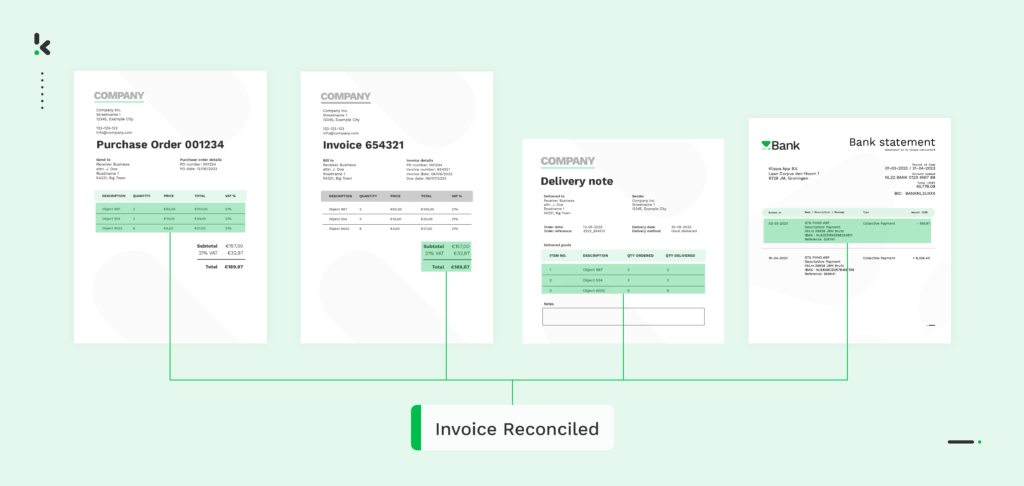
In day-to-day business operations, where financial transactions flow continuously, the process of invoice reconciliation stands as a vital checkpoint for financial accuracy, compliance, and operational efficiency.
Manually reconciling invoices burdens businesses with time-consuming, error-prone processes, impacting cash flow and vendor trust.
In this blog, we’ll look at why invoice reconciliation matters, how it can be done, and how automated invoice reconciliation can help in the process. Let’s dive in!
Key Takeaways
- Invoice reconciliation ensures supplier invoices match what was ordered, received, and paid for.
- Matching documents include purchase orders, goods received notes, contracts, and bank payment records.
- Key checks verify quantities, prices, descriptions, taxes, and payment terms for accuracy.
- Common issues flagged include quantity mismatches, price variations, duplicate charges, and missing approvals.
- Automated reconciliation saves time, improves accuracy, detects duplicates, and simplifies compliance.
- Doxis AI.dp automates the entire workflow, integrates with ERP systems, and maintains a full audit trail.
What is Invoice Reconciliation?
Invoice reconciliation ensures that supplier invoices match what your business ordered, received, and agreed to pay. It works by comparing each invoice with key documents, most often the purchase order, goods received note or delivery note, relevant contracts, and bank payment records, to establish a complete and accurate transaction trail.
Thorough reconciliation prevents costly problems. It stops overpayments, catches duplicate invoices, avoids paying for goods or services that were never delivered, and reduces the risk of financial fraud. It also helps maintain healthy vendor relationships by resolving issues quickly and transparently. .
Why is Invoice Reconciliation Important?
The importance of invoice reconciliation for a business cannot be understated. It plays a pivotal role in maintaining accurate financial records, ensuring compliance, and preventing fraud within your business. Here are some of the main reasons why invoice reconciliation is important:
Financial accuracy
Invoice reconciliation helps maintain financial accuracy. This way you can keep precise financial records and prevent discrepancies that could lead to financial losses. With invoice reconciliation, you can ensure that bills issued by vendors match the goods or services received by your organization.
Spend management
By reconciling invoices, you can track your expenses accurately and manage your cash flow effectively. This process allows you to monitor your spending patterns, identify areas where costs can be reduced, and prioritize payments to vendors based on your budget.
Regulatory compliance and auditing
Invoice reconciliation is vital for maintaining regulatory compliance and auditing standards. Properly reconciled invoices create a transparent financial transaction trail, which is crucial for adhering to accounting principles and regulations. It streamlines audits by ensuring accurate and verifiable financial records.
Vendor relationships
Timely and accurate invoice reconciliation contributes to positive vendor relationships. Promptly addressing discrepancies demonstrates reliability, fostering better terms and collaboration.
Operational efficiency
Reconciling invoices can help you spend less time on the administrative burdens that come with the accounts payable process. During reconciliation, you can better identify billing errors, prevent late payments, and make sure all financial obligations are met on time.
The level of accuracy and precision in your invoice reconciliation process is important for maintaining transparency and compliance within your organization. We will now take you through some of the different methods or types of invoice reconciliation.
Types of Invoice Reconciliation
Businesses can approach invoice reconciliation in several ways depending on the volume of invoices, the complexity of orders, and the tools available. Choosing the right method helps maintain accuracy, reduce processing time, and prevent payment errors.
Two-way matching
Two-way matching compares the supplier invoice directly to the purchase order to verify that the goods or services were ordered at the agreed price.
Three-way matching
An additional layer of verification is added by three-way matching the invoice to both the purchase order and the goods received note. This ensures that the correct item, quantity, and price were received and billed.
Vendor statement reconciliation
Vendor statement reconciliation involves comparing all invoices for a set period to the statement provided by the vendor. It helps identify missing or duplicate invoices and ensures all transactions are accounted for.
Credit card reconciliation
This matches credit card statements to invoices for purchases. It ensures that each charge is legitimate and supported by proper documentation.
Manual reconciliation
Invoices are cross-checked against documents by staff using paper records or spreadsheets. This can be effective for low volumes but is time-consuming and prone to human error.
Automated reconciliation
Specialized software uses Optical Character Recognition (OCR) and matching algorithms to extract invoice data, compare it to purchase orders and delivery notes instantly, flag discrepancies, and maintain a complete audit trail. This is faster and more reliable than manual checks, especially for large volumes.
Invoice Reconciliation in 5 Steps
While invoice reconciliation can be complex, the essential process can be broken down into five clear steps. Following these steps makes it easier to spot errors, maintain accurate records, and keep payments on track.
Step 1: Gather all relevant documents
Collect the supplier invoice, the purchase order, the goods received note or delivery receipt, any related contracts, and your bank transaction records.
Step 2: Create a ledger for the period
Record every transaction from the reconciliation period in your accounts or expense management system. Include both incoming payments from customers and outgoing payments to vendors.
Step 3: Match details across documents
Check that quantities, prices, product descriptions, taxes, and payment terms are consistent between invoices, purchase orders, and delivery records.
Step 4: Flag and investigate discrepancies
Identify any mismatches such as incorrect quantities, unexpected pricing, duplicate charges, or missing approvals. Investigate the source of each discrepancy before releasing payment.
Step 5: Resolve and record final approvals
Correct any errors, document the resolution, and record the final approval in your accounting system. Only once the invoice matches your records should payment be processed.
How Automation Transforms Invoice Reconciliation
Automation replaces the slow, error‑prone nature of manual invoice reconciliation with a fast, reliable process that scales easily as your business grows. By using intelligent OCR and matching algorithms, invoice data is captured, verified, and approved automatically.
Key benefits of automated invoice reconciliation:
- Save time by processing invoices in seconds instead of hours.
- Improve accuracy with instant data extraction and matching against purchase orders and delivery records.
- Detect duplicate invoices before payment to prevent overcharges and fraud.
- Ensure compliance with company policies and regulatory requirements through built‑in validation rules.
- Simplify audits with a complete, transparent transaction trail.
- Reduce costs by cutting manual labor and avoiding payment errors.
- Enhance vendor relationships by processing and resolving invoices quickly.
Automate Your Invoice Reconciliation with Doxis SpendControl
Manual reconciliation slows down processing, increases the risk of errors, and can leave gaps in compliance. Doxis SpendControl eliminates these inefficiencies by using AI‑powered data extraction and intelligent matching to verify invoices automatically against purchase orders and delivery records. Every check happens in seconds, with discrepancies flagged before payment is approved.
This streamlined approach improves accuracy, reduces duplicate payments, and enforces your company’s business rules. With seamless ERP integrations and full audit trails, Doxis SpendControl helps you maintain control while accelerating vendor payment cycles.
With Doxis SpendControl you can:
- Capture invoices digitally from email, scan, or API input.
- Extract key invoice data automatically, including invoice number, totals, tax amounts, and currencies.
- Match invoices to purchase orders and goods received notes in real time.
- Flag price, quantity, or payment term mismatches instantly.
- Detect duplicate invoices to prevent overpayment and fraud.
- Apply custom approval workflows based on your business rules.
- Integrate directly with ERP/accounting systems such as SAP, Xero, and NetSuite.
- Maintain transparent, compliance‑ready audit logs.
Ready to modernize your invoice reconciliation process? Schedule a free demo or contact our specialists to see how Doxis SpendControl can help you automate matching, validation, and approval workflows from start to finish.
FAQ
Invoice reconciliation is the process of matching supplier invoices with purchase orders, goods received notes, and payment records to ensure accuracy and detect errors before payment is made.
2. Why is invoice reconciliation important?
It prevents overpayments, duplicate charges, and fraud, ensures accurate financial records, supports compliance, and maintains strong vendor relationships.
3. What documents are used in invoice reconciliation?
Invoices, purchase orders, goods received notes or delivery receipts, contracts, and bank payment records.
4. What errors can invoice reconciliation detect?
Common errors include quantity mismatches, price differences between the invoice and purchase order, duplicate charges, and payments without proper authorization.
5. How often should businesses reconcile invoices?
Most businesses reconcile monthly, while high-volume operations often reconcile weekly or daily to catch issues quickly.
6. How does automation improve invoice reconciliation?
Automation uses OCR and matching algorithms to capture invoice data instantly, compare it to source documents, flag mismatches, detect duplicates, and maintain a complete audit trail for compliance.