

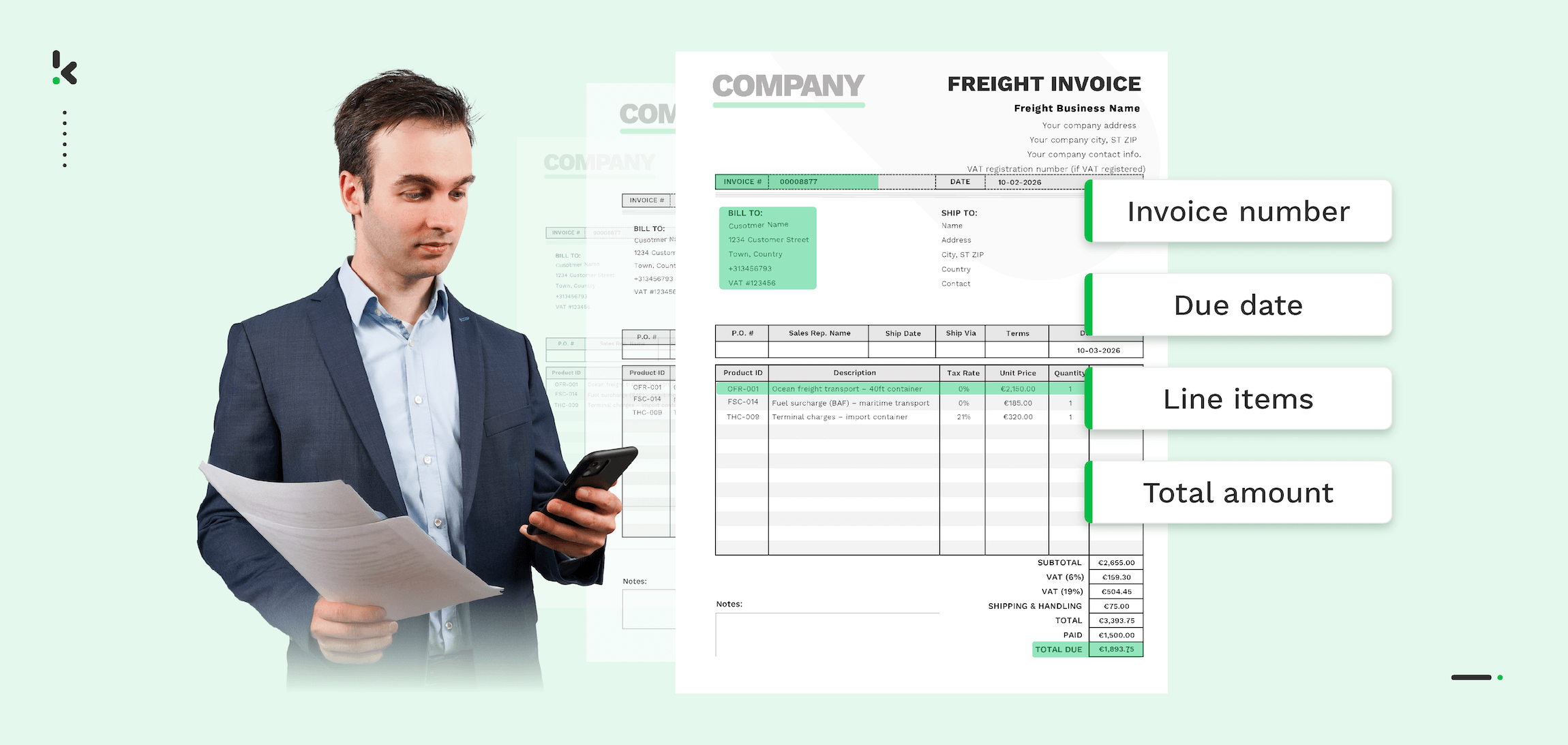
Freight invoice automation cuts processing time from 30 minutes to under one minute while eliminating most errors for 3PLs and freight forwarders. This matters because freight invoice processing is one of the most time‑consuming and error‑prone tasks in logistics. The sheer scale of operations means thousands of invoices must be reviewed, matched, and approved each month. Manual handling slows payments, creates costly disputes, and weakens supplier relationships.
Studies show that over 60 percent of invoice errors come from manual data entry. In high‑volume logistics, even minor inaccuracies can disrupt cash flow. Automation replaces these inefficiencies with AI‑powered Optical Character Recognition (OCR) and Intelligent Document Processing (IDP) that process invoices in seconds, boost accuracy, and keep workflows audit‑ready. Real‑time visibility and instant error flags ensure payments are correct and on time without overloading your team.
The U.S. Census Bureau’s Commodity Flow Survey reports that goods worth 14.5 trillion dollars were moved across the United States in a single year, with trucks carrying 71.6 percent of that value. Globally, trade flows are expected to exceed 35 trillion dollars in 2025 according to UNCTAD’s Global Trade Update, highlighting the complexity logistics operations face worldwide.
In this guide, you’ll learn what freight invoice processing is, why manual methods fail, and how automation can turn it into a faster, more reliable, and scalable process.
Key Takeaways
- Freight invoice processing is a time‑consuming and error‑prone task, especially for 3PLs and freight forwarders handling high volumes.
- Manual data entry causes most invoice errors, leading to payment delays, compliance risks, and strained supplier relationships.
- Automation with AI‑powered OCR, Intelligent Document Processing (IDP), and Robotic Process Automation (RPA) can cut processing time from 30 minutes to under one minute per invoice.
- The six‑step automation workflow: collect and digitize invoices, extract data, define matching rules, automate approvals, integrate payment systems, and monitor performance.
- Benefits include faster processing, higher accuracy, reduced costs, improved visibility, quicker dispute resolution, audit‑ready compliance, and scalability.
- Klippa’s DocHorizon platform delivers all these capabilities in one secure, integrated solution for modern logistics operations.
What is Freight Invoice Processing?
Freight invoice processing is the task of reviewing, verifying, and approving invoices issued by freight carriers for the transportation of goods. It involves checking that the charges billed match the agreed rates, the services provided, and the shipment details before payment is released. In logistics and 3PL operations, this process ensures you only pay for freight services that were ordered, delivered, and billed correctly.
A freight invoice, sometimes called a freight bill, typically includes:
- Origin and destination details of the shipment
- Description, quantity and weight of the goods transported
- Service charges and surcharges such as fuel, handling or customs fees
- Dates for shipment and delivery
- Applicable taxes and total cost
- Payment terms and methods
For carriers, the freight invoice summarizes all charges for a shipment based on the Bill of Lading and any additional services provided. For shippers, it is the formal request for payment from the carrier, specifying exactly what was transported and at what cost.
Why Manual Freight Invoice Processing Falls Short
Manual freight invoice processing may seem manageable at low volumes, but it quickly becomes inefficient, costly and risky as your business grows. Relying on paper documents, spreadsheets or manual data entry slows down operations and leaves room for human error that impacts both finances and supplier relationships.
Key challenges of manual processing:
- Time-consuming processes
Reviewing and matching each invoice line by line can take up to 30 minutes. For logistics companies handling thousands of invoices each month, this adds up to hundreds of hours that could be spent on strategic work. - High error rate
According to APQC, more than 60 percent of invoice errors come from manual data entry. Even experienced staff can overlook discrepancies or miskey information, resulting in overpayments, missed discounts, or disputes with carriers. - Limited visibility and tracking
Paper and unconnected digital files make it hard to see invoice status, spot delays, or identify recurring issues. Without a centralized view, your team spends more time searching for documents than solving problems. - Slow dispute resolution
If a mismatch is discovered, handling it manually can delay payments further. Suppliers may become frustrated, and your business can lose negotiating leverage. - Scalability limits
As trade volumes increase, manual processes simply cannot keep pace. With global trade flows expected to reach 35 trillion dollars in 2025, according to UNCTAD, logistics operations will need faster, more accurate systems to compete.
Manual freight invoice processing creates a bottleneck in your accounts payable workflow. It eats up resources, introduces costly errors, and slows down the financial heartbeat of your logistics business. The larger your operations, the bigger the impact of every delay and mistake.
Step-by-Step Guide to Automating Freight Invoice Processing
Automation transforms freight invoice processing from a slow, manual bottleneck into a streamlined, accurate workflow. By following these steps, you can set up a process that saves time, reduces costs, improves accuracy, and strengthens your relationships with carriers and suppliers.
Step 1: Collect and Digitise Your Freight Invoices
Bring all invoices into a central, digital location to eliminate scattered paperwork and inconsistent sources.
- Intake from multiple channels such as email, EDI transmissions, API feeds or secure uploads
- Store and tag invoices for easy retrieval and audit purposes
- Standardize formats for dates, currencies and units of measure so later steps run smoothly
Step 2: Extract Key Data Using AI-Powered OCR
Use freight invoice OCR to convert invoice images or PDFs into structured data automatically.
- Capture critical fields like invoice number, dates, origin and destination, service descriptions and charges
- Classify documents by type (e.g. invoices, bills of lading, receipts) so they are correctly matched later
- Ensure data is standardized for consistent matching
Step 3: Define Matching Rules
Set clear rules that determine how an invoice is validated.
- Two-way matching: compare invoice to purchase order (PO)
- Three-way matching: compare invoice, PO, and goods receipt for added assurance
- Four-way matching: add inspection reports for complex shipments
- Check rates against contracted terms and ensure quantity, weight and surcharge details align with agreements
Step 4: Automate Approval Workflows
Routing approvals automatically saves time and reduces bottlenecks.
- Create role-based permissions so the right people get the right invoices
- Route quantity discrepancies to warehouse teams, price mismatches to procurement and other issues to accounts payable
- Set escalation paths for unresolved exceptions
- Allow minor, pre-approved variances to be auto-processed
Step 5: Integrate with Payment Systems
Smooth integration between invoice automation and payment scheduling speeds up the final step.
- Connect to ERP or financial platforms to update invoice status automatically
- Trigger payments once approvals are complete
- Maintain audit logs for every transaction to support compliance
Step 6: Monitor and Improve
Automation is most powerful when you track and refine it over time.
- Use dashboards to track processing times, accuracy rates and costs per invoice
- Identify recurring discrepancies and address their root causes
- Adjust matching rules and workflows as your logistics operations evolve
Automating freight invoice processing follows a logical sequence: collect, read, match, approve, pay, and review. By setting this up early, your business can handle current workloads efficiently and scale with growing trade volumes.
Benefits of Automating Freight Invoice Processing
Once you replace manual freight invoice handling with a modern automated workflow, the difference is immediate. Your business gains speed and accuracy while reducing operating costs, improving transparency, and building stronger supplier relationships.
1. Faster Processing
Automation reduces invoice processing time from 30 minutes to under one minute per invoice by eliminating manual data entry and repetitive matching checks. This keeps your payment cycles moving and frees your team to focus on higher‑value tasks.
2. Increased Accuracy
AI‑powered OCR and Intelligent Document Processing reduce human error. Data is captured and matched consistently according to your rules, helping you avoid costly overpayments and missed early‑payment discounts.
3. Lower Operational Costs
By removing manual steps, you can cut invoice processing costs by as much as 80 percent. Savings come from reduced labor hours, fewer dispute resolutions, and less time spent searching for documents.
4. Real-Time Visibility
Automated systems provide dashboards and reports that show invoice status, discrepancies, and approval progress instantly. This transparency allows you to make quick decisions and track performance at a glance.
5. Faster Dispute Resolution
When mismatches are flagged immediately and routed to the right team member, resolution happens before payment is sent. This protects cash flow and keeps suppliers confident in your process.
6. Audit-Ready Compliance
Automated processing builds a complete audit trail automatically. Every approval, change, and communication related to an invoice is securely logged and available for compliance reporting.
7. Scalability for Growth
With trade volumes expected to rise sharply in the coming years, manual processes can’t keep up. Automation allows you to scale invoice handling without hiring additional staff or sacrificing accuracy.
Key Technologies Behind Freight Invoice Automation
Modern freight invoice automation combines several technologies that work together to read, match, and process invoices with speed and accuracy. Knowing what each component does will help you choose the right solution for your business.
Optical Character Recognition (OCR)
OCR is the technology that converts printed or scanned text into digital, searchable data. It allows invoices in formats like PDF or scanned images to be read automatically, removing the need to type details manually.
Intelligent OCR (iOCR)
Unlike standard OCR, intelligent OCR uses AI to understand different layouts and formats. It can recognize and adapt to variations in invoice templates from different carriers, making it ideal for logistics where document formats are rarely consistent.
Intelligent Document Processing (IDP)
IDP takes OCR a step further by not just reading text but also classifying documents, extracting specific fields, and standardizing data for accurate matching. It handles both structured documents (like spreadsheets) and unstructured documents (like PDFs and images).
Artificial Intelligence (AI) and Machine Learning (ML)
AI and ML algorithms are used to decide whether invoice data is correct. They compare extracted information against purchase orders, bills of lading, and contracted rates. Over time, the system learns from past matches and mismatches to improve accuracy.
Robotic Process Automation (RPA)
RPA automates the repetitive tasks involved in processing invoices. For example, it can route approvals to the right person, update ERP systems, trigger payment schedules, and send notifications without human intervention.
How These Technologies Work Together
- OCR/iOCR reads the invoice data.
- IDP organizes and standardizes it.
- AI/ML matches it against your records and flags discrepancies.
- RPA completes the workflow, from routing exceptions to triggering payments.
By combining these technologies, automated freight invoice systems can handle large volumes of documents quickly and accurately, give you complete visibility into the process, and ensure compliance without adding manual work.
Real-Life Applications of Freight Invoice Automation
Implementing automated freight invoice processing can significantly improve the daily operations of logistics businesses. Here are some common scenarios where automation delivers measurable benefits.
Scenario 1: High-Volume 3PL Operations
A third-party logistics provider handles thousands of shipments per month from multiple carriers. Documents arrive in different formats such as PDFs, Excel files, scanned images, and EDI feeds.
- Automation reads and standardizes all invoice data with intelligent OCR.
- Matching rules link each invoice to its purchase order and bill of lading.
- Exceptions such as incorrect freight rates or missing documentation are flagged instantly and sent to the right department.
Result: Processing time drops from several weeks to a few days and accuracy climbs above 98 percent.
Scenario 2: Preventing Overpayments
A freight forwarder has rate agreements in place with dozens of carriers. Without automation, invoice reviews are manual and error-prone.
- AI and IDP check each invoice line against contracted rates, accessorial charges, and agreed surcharges.
- Discrepancies are caught before payment authorization.
Result: Overpayments are reduced by thousands of dollars each month and supplier trust increases.
Scenario 3: Global Logistics Network
A multinational company ships goods across several continents with invoices in multiple languages and currencies.
- Intelligent OCR recognizes local formats and converts data to a standardized global template.
- RPA routes invoices to regional approval teams while keeping a central dashboard of all transactions.
Result: Global visibility and centralized control improves decision-making and compliance across borders.
Scenario 4: Improved Dispute Resolution
A shipper regularly faces disputes over accessorial charges. Manual resolution could delay payments by weeks.
- Automated matching highlights charge discrepancies immediately.
- Relevant shipment documentation is attached automatically for review.
Result: Disputes are settled before payment schedules are affected, keeping carrier relationships strong.
Security and Compliance in Freight Invoice Automation
When you automate freight invoice processing, security and compliance must be built into every step. Freight invoices contain sensitive financial, contractual, and operational data, so it is essential to protect this information and meet industry regulations.
Data Security Measures
Robust security features safeguard invoices from unauthorized access or tampering.
- Role-based access control ensures that only authorized personnel can review or approve certain types of invoices.
- Encrypted data storage protects sensitive shipment and payment information, both at rest and during transmission.
- Secure document intake portals prevent interception or manipulation of invoices before processing.
Compliance With Industry Standards and Regulations
Automated invoice systems should meet global and regional compliance requirements.
- ISO 27001 certification for information security management confirms standardized protection practices.
- GDPR compliance ensures proper handling of personal data in international operations.
- Local transport and financial regulations must be met for your region and industry.
Audit-Ready Workflows
Automation platforms create detailed, time-stamped logs of every action taken on an invoice.
- Every change, approval step, and communication related to the document is recorded.
- Audit trails can be exported for internal reviews or regulatory checks at any time.
- Built-in reporting tools make it easier to prepare for external audits without pulling records manually.
Fraud Prevention
Automated systems can detect suspicious invoices before payment is made.
- Duplicate invoice detection stops accidental double payments.
- Document integrity checks ensure invoices have not been altered after issuance.
- Matching against master data helps identify unauthorized charges or suppliers.
By combining strong security protocols, compliance with recognized standards, and automated audit capabilities, freight invoice automation protects your business from risks while ensuring transparency. This allows you to process invoices confidently, knowing they meet all legal and operational requirements.
Why Choose Klippa for Freight Invoice Automation
Klippa’s DocHorizon platform combines powerful AI-driven OCR, intelligent document processing, and seamless integrations to make freight invoice automation faster, more accurate, and fully compliant.
Key Benefits:
- Capture invoices instantly from PDFs, scans, Excel, and EDI feeds with unmatched accuracy—automatically routing them to the right workflows.
- Prevent costly errors with advanced matching against purchase orders, shipment records, and contracted rates, plus fraud detection that flags duplicates or tampering.
- Integrate effortlessly with ERP, TMS, and payment systems to eliminate manual re-entry and reduce processing risks.
- Go global with ease, processing multiple currencies and languages while adapting to local document formats.
- Stay secure and compliant with ISO 27001 certification, GDPR adherence, and audit-ready trails.
- Review exceptions quickly using human-in-the-loop checks to ensure every payment is correct.
Manual freight invoice processing slows payment cycles, introduces costly errors, and strains relationships with carriers and suppliers. Automating your workflow with Klippa can cut processing time from 30 minutes to under one minute, boost accuracy, prevent overpayments, and maintain full compliance.
Take the next step: contact Klippa today or request a free demo to see how DocHorizon can transform your logistics operations.
FAQ
1. What is freight invoice processing?
Freight invoice processing is the review, verification, and approval of invoices issued by carriers for transporting goods. It ensures the charges match agreed rates, the services were delivered, and payment is made accurately.
2. Why is manual freight invoice processing inefficient?
Manual processing is slow, taking up to 30 minutes per invoice, and prone to human error. It can cause payment delays, overpayments, compliance risks, and strained supplier relationships.
3. How can automation improve freight invoice processing?
Automation uses technologies like AI-powered OCR, Intelligent Document Processing (IDP), and Robotic Process Automation (RPA) to read invoice data, match it against records, flag errors, and route approvals automatically. This reduces processing time to under one minute and greatly improves accuracy.
4. What are the main steps in automating freight invoices?
First, gather and digitize all invoices, then extract the key data using OCR. Next, set matching rules, automate the approval workflows, integrate the system with payment solutions, and continuously monitor the process to make ongoing improvements.
5. What benefits can my business expect from automation?
Key benefits include faster processing, higher accuracy, lower operational costs, better visibility, quicker dispute resolution, audit-ready compliance, and scalability to handle increased volumes.
6. What technologies make automation possible?
Automation relies on OCR/iOCR for reading invoices, IDP for classification and data standardization, AI/ML for intelligent matching and error detection, and RPA for automating repetitive tasks.
7. Is automated freight invoice processing secure?
Yes. With robust measures like role-based access control, encryption, ISO 27001 certification, GDPR compliance, and fraud detection tools, automated systems protect sensitive financial data.
8. Can automated systems handle invoices in multiple formats and languages?
Modern solutions like Klippa’s DocHorizon can process invoices in various formats (PDF, image, Excel, EDI) and support multiple currencies and languages, making them ideal for global logistics operations.
9. How quickly can my business implement automation?
Implementation time varies based on complexity, but with scalable solutions that integrate with ERP and TMS platforms, you can start seeing results in weeks, not months.
10. How does Klippa help with freight invoice automation?
Klippa’s DocHorizon platform combines AI-powered OCR, advanced data matching, fraud detection, and secure integration with existing systems to streamline, secure, and accelerate your freight invoice workflows.