


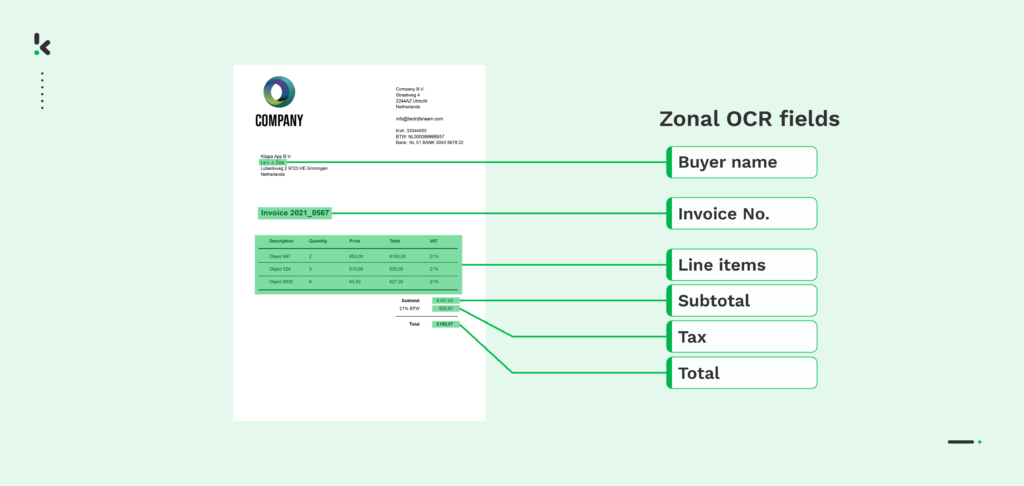
Zonal OCR lets businesses extract only the data that matters, directly from predefined areas on a document, saving time, reducing errors, and improving processing speed by up to 90%.
Unlike traditional OCR, which scans an entire page, Zonal OCR targets specific fields such as invoice numbers, totals, or customer names, turning them into structured data ready for your ERP, CRM, or accounting system.
In this guide, you’ll learn exactly what Zonal OCR is, how it works, its advantages and limitations, common business use cases, and why modern Intelligent Document Processing (IDP) platforms like Doxis AI.dp can outperform template-based OCR in complex workflows.
Key Takeaways
- Zonal OCR extracts specific fields like invoice totals or PO numbers with 95–99% accuracy and up to 90% faster processing.
- Uses a template-based workflow: define zones, preprocess documents, read only target areas, export structured data.
- Best for fixed-layout documents such as invoices, bank statements, ID cards, and forms.
- Limitations: fixed layouts, high maintenance for varied sources, image quality sensitivity, no AI adaptability.
- Doxis AI.dp removes these limits with template-free AI OCR, compliance features, and 200+ integrations.
What is Zonal OCR?
Zonal OCR, also known as Zone OCR or Template OCR, is a specialized form of Optical Character Recognition that extracts data only from pre‑defined regions (“zones”) in a document.
This method is ideal when key information appears in fixed positions across batches of documents, such as standardized invoices, purchase orders, bank statements, or ID cards.
By scanning these zones rather than the entire page, Zonal OCR delivers higher accuracy, faster processing, and reduced noise in your datasets.
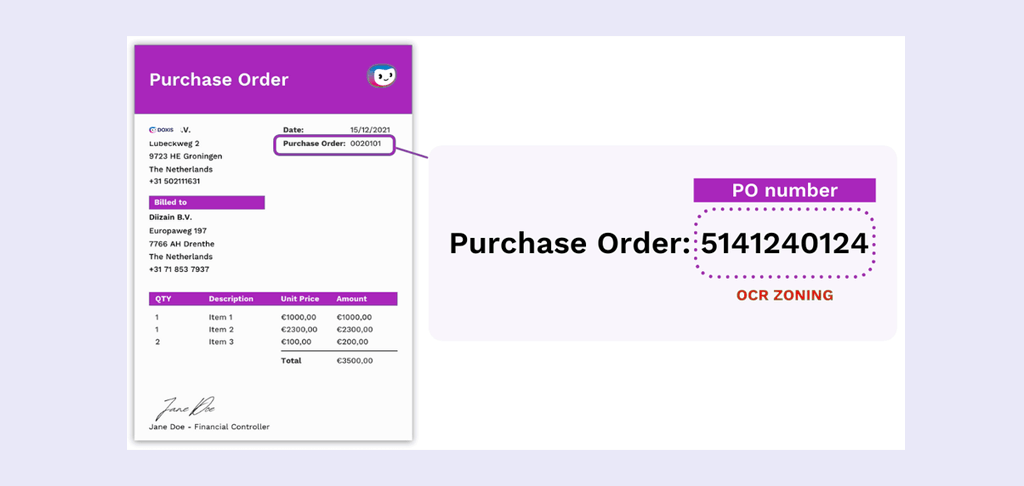
In the example below, you can see a PO number being identified and extracted by Zonal OCR:
How Zonal OCR Works – Step-by-Step
Step 1: Template Creation
Upload a representative sample of your document type and draw bounding boxes around the fields you want captured (e.g., Invoice_Number, Total_Amount, Due_Date).
Each zone is assigned a label and coordinates that the OCR engine will look for in every future document of that layout.
Step 2: Document Pre‑Processing
Boost recognition accuracy by optimizing the source:
- Deskew tilted scans
- Noise reduction to remove background speckles
- Binarization to sharpen text contrast
- Resolution enhancement (300 DPI recommended)
Step 3: Zone Detection & Text Recognition
The OCR engine restricts its character recognition to the defined zones, ignoring any other content on the page.
Step 4: Structured Output
Extracted data is converted into machine‑readable formats such as CSV, JSON, XML – ready for direct ingestion into ERP, CRM, accounting, or analytics systems.
Zonal OCR vs Traditional OCR vs Intelligent Document Processing (IDP)
Advantages of Zonal OCR
When applied to the right type of documents, Zonal OCR delivers measurable efficiency and accuracy benefits:
- High Precision on Fixed Layouts
By reading only predefined zones, Zonal OCR ignores irrelevant text, logos, and images, resulting in accuracy rates of 95–99% on consistent layouts. - Significant Processing Speed Gains
A single invoice can be processed in 3–5 seconds, compared to 15–30 minutes of manual data entry, freeing up staff for higher-value tasks. - Cost Reduction in Routine Workflows
For standardized documents like internal forms or fixed vendor invoices, automation can lower document processing costs by 80–90%. - Cleaner, Structured Data Output
Extracted fields can be exported directly to CSV, JSON, XML, or XLSX, ready for ERP, CRM, or analytics, eliminating manual data reformatting. - Ease of Deployment for Simple Cases
Template setup is visual and intuitive (point‑and‑click box drawing), meaning non‑technical staff can implement Zonal OCR in hours. - Supports Paperless Initiatives
Digitizing paper forms, invoices, or IDs into structured data improves accessibility, searchability, and audit readiness.
Disadvantages and Limitations of Zonal OCR Software
Zonal OCR’s template-based nature creates inherent scalability and flexibility constraints:
- Dependency on Fixed Layouts
Any change in document design, even minor field position shifts, requires new template creation, making it brittle for diverse or evolving document sets. - Inefficiency with Varied Sources
Organizations processing documents from hundreds of suppliers (or in multiple countries) face hundreds of templates to maintain, which quickly becomes unmanageable. - Weakness in Semi‑Structured or Unstructured Data
Not suitable for documents with variable field positions, narrative text, or complex tables without consistent alignment. - Sensitivity to Image Quality
Low-resolution scans, skewed pages, or noisy backgrounds can cause misalignment between zones and actual text, reducing accuracy. - Limited Handling of Sequential or Repeating Data
Struggles when fields (like line items) repeat vertically or span multiple zones. Requires complex workarounds. - Static Rules – No Learning Capability
Zonal OCR cannot adapt or improve over time. It has no AI to recognize patterns or context beyond what was manually configured.
Use Cases of Zonal OCR
Zonal OCR can be used in many sectors to speed up and automate various data processing and collection processes. As long as there’s data to be extracted from a readable document, Zonal OCR will work.
Some processes that can benefit from using Zonal OCR are given below:
Identity Document Processing
ID cards, passports and driving licenses are used in many sectors to verify people’s identities. Manually verifying the data and putting it into a computer is time-consuming and leaves room for errors. Zonal OCR can easily collect data from identity documents and store the data in a structured database, for further automation or processing.
Invoice Processing
All businesses have to deal with invoice processing. That’s no problem by itself, but if you deal with thousands of invoices every day, it will get hard to keep track of them and collect data in a structured manner. Zonal OCR can easily identify merchant names, addresses, dates, total amounts, product names, and other information from the invoice and store it accordingly.
Purchase Order Processing
Similarly to invoices, Zonal OCR makes it easier to take certain data from a purchase order and store it in a way that allows for better data visualization and tracking.
Bank Statement Processing
Organizations often have a huge number of bank statements to further process and make a certain report or analysis. Zonal OCR makes it easier to read and collect specific information from bank statements, such as balances, total amounts, and transaction lines.
Form Processing
All sorts of businesses and service providers use registration forms. Most of the time, data from registration forms is manually put in a certain order to keep track. This is extremely time-consuming and boring to do. A Zonal OCR solution can automate form processing and do this very efficiently and effectively, especially when it concerns some standardized forms.
Some other real-life use cases include text detection from objects and images, utility bill processing, receipt processing for warranty procedures, bill of lading processing, and many more.
Why Doxis AI.dp Outperforms Zonal OCR
Doxis AI.dp isn’t limited by rigid templates. It’s a fully AI‑powered Intelligent Document Processing (IDP) platform that delivers the same precision as Zonal OCR without the scalability bottlenecks – handling thousands of layouts, languages, and document types automatically.
With Doxis AI.dp, you can:
- Extract and validate data from any document layout, no template creation required
- Achieve 99% accuracy with AI‑powered OCR, even on variable formats
- Automate classification, verification, and fraud detection in the same workflow
- Redact sensitive information to meet GDPR and ISO compliance standards
- Process documents in seconds, cutting manual handling time by up to 90%
- Integrate with your ERP, CRM, accounting software, or 200+ other systems via API, SDK, or SFTP
Whether you’re processing invoices from diverse suppliers, onboarding clients with ID verification, or digitizing compliance records, Doxis AI.dp adapts instantly – so you can maintain speed, accuracy, and compliance without the maintenance burden of Zonal OCR templates.
Ready to replace outdated, template-bound OCR with a scalable AI solution? Contact our experts or book a free demo today to see Doxis AI.dp in action.
FAQ
Structured documents with consistent layouts, such as invoices from a fixed vendor list, purchase orders from one ERP, government forms, bank statements, and standard ID cards.
Basic Zonal OCR struggles when field positions move. Any layout change requires a new template. AI‑powered IDP solutions like Doxis AI.dp adapt to changes without manual reconfiguration.
Industry benchmarks place Zonal OCR accuracy at 95–99% for high‑quality scans with consistent layouts. Accuracy drops significantly with skewed, noisy, or low‑resolution images.
CSV, JSON, XML, XLSX, and more, enabling seamless integration with ERP, CRM, accounting, and data warehouses.
Zonal OCR itself is secure only if processed in a compliant environment. IDP software like Doxis AI.dp adds encryption, GDPR compliance, data masking, and fraud detection automatically.