


Thinking about automating your accounts payable process? The data is clear. Automating AP can deliver a 700% ROI within the first year for most mid-sized businesses. While manual workflows cost the average company $10.18 per invoice, best-in-class automated departments have slashed that to just $3.12. Yet, despite these numbers, only 5% of AP teams are fully automated. This represents a massive opportunity to turn a back-office cost center into a driver of efficiency and captured discounts.
In this guide, we provide the exact methodology to measure the impact of automation on cost, speed, and accuracy. We will break down the hidden costs of manual entry, show you how to capture the 1–2% early payment discounts you are currently missing, and provide a free ROI calculator to run your own numbers.
Key Takeaways
- ROI Potential: Most businesses recover their investment within 6–8 months, reaching up to 700% ROI in Year 1.
- Cost Savings: Reduce all-in invoice processing costs by 70% to 80%.
- Speed: Cut turnaround times from 9+ days down to under 24 hours.
- Accuracy: Eliminate manual data entry errors, achieving up to 99.5% accuracy via AI-powered OCR.
- The ROI Formula: ROI % = [(Total Annual Savings – Total Annual Costs) / Total Annual Costs] * 100
A Fresh Reminder on the Accounts Payable Process
Before we dive into ROI, let’s quickly rewind. What is accounts payable, really?
At a basic level, it’s how businesses handle the money they owe, usually to suppliers or service providers. An invoice comes in, someone reviews it, approves it, pays it, and records it. Simple, right?
Well… not quite.
Even the most straightforward AP process is made up of a lot of moving parts, especially when it’s still manual.
Here’s what that usually looks like:
- Invoices coming in from every direction – email, PDFs, even paper
- Manually entering data into your system
- Matching each invoice with a purchase order (if there is one)
- Routing it to the right person for approval (and following up when they forget)
- Scheduling the payment
- Filing it away for audits, finance reports, or when someone asks about it six months later
When you’re only processing a few invoices a month, it’s manageable. But for most businesses, those invoices pile up fast, and so do the delays, errors, and admin hours.
Now let’s see how much all that manual work is costing you.
The Hidden Costs of Manual AP
Market research reveals that manual invoice routing and data entry errors are the biggest challenges for finance teams today. When you rely on paper or email based workflows, you are losing money on every transaction. These costs are often buried in overhead, but they represent a significant drain on your bottom line.
The Real Price of an Invoice
Industry benchmarks from the State of ePayables report show that the average cost to process a single invoice manually is 9.40 dollars. This figure includes staff time, technology, and general overhead. When you switch to automation, that cost typically drops to around 3.50 dollars per invoice. For a business handling 500 invoices a month, this transition represents a massive annual saving in administrative spend.
The Speed Barrier
Data shows that it takes an average of 9.15 days to process one manual invoice. This slow cycle creates a backlog that leads to late payment penalties and strained vendor relationships. Automation removes these human bottlenecks. It allows your team to move an invoice from receipt to approval in a fraction of the time.
The Error Multiplier
Manual data entry is inherently risky. Roughly 10 percent of manual invoices contain errors such as duplicate entries, incorrect totals, or missing purchase order numbers. Correcting these mistakes is a time consuming process that drains your team of productivity. Automated systems use advanced technology to flag these issues before they enter your accounting software.
Hidden Financial Leaks
Manual processes make it easy to miss early payment discounts. These incentives are usually worth 1 or 2 percent of the total invoice value. If your team cannot process payments within the discount window, you are essentially leaving free money on the table. Beyond missed discounts, manual systems are also more vulnerable to duplicate payments and internal fraud.
Direct vs. Indirect ROI
When you build a business case for automation, you must look at two types of returns. Direct ROI includes the hard savings that show up on your balance sheet immediately. Indirect ROI represents the strategic value that improves your company over time. Both are essential for a complete picture of your investment.
Direct Savings: Direct ROI is often the easiest to measure because it focuses on tangible expenses. These are the “hard” savings your finance department will see in the first year.
- Labor Cost Reduction: This is your largest saving. Automation allows your team to process invoices much faster. This means you can handle higher volumes without hiring more staff.
- Capturing Early Payment Discounts: Many suppliers offer a 1 or 2 percent discount for quick payment. Automation helps you hit these deadlines consistently.
- Elimination of Late Fees: Faster approval cycles ensure you never pay a penalty for a late invoice again.
- Reduced Processing Costs: You eliminate expenses for paper, ink, postage, and physical storage.
Indirect Benefits: Indirect ROI includes qualitative improvements. These factors do not always have a specific price tag, but they reduce risk and improve company health.
- Better Vendor Relationships: Suppliers prefer to work with companies that pay on time and offer transparency. This can lead to better contract terms in the future.
- Audit Readiness: Automated systems create a digital audit trail. This makes year end audits faster and much less stressful for your team.
- Fraud Prevention: Automated 3-way matching catches duplicate invoices or fraudulent billing before a payment is even scheduled.
- Employee Retention: Replacing tedious data entry with high value tasks improves morale. It reduces the high cost of employee turnover in your finance department.
Industry Specific ROI Benchmarks
AP automation offers a significant return on investment for any business. However, the specific drivers of that ROI often change depending on your industry. Understanding these variations helps you focus on the metrics that matter most for your specific operations.
Logistics and Transportation
In the logistics sector, companies handle a high volume of international invoices. These often involve different currencies and complex tax rules. The ROI here is driven by the speed of processing and the elimination of manual currency conversion. Automated systems reduce the time spent on these tasks by as much as 70 percent. This allows logistics firms to scale their operations without increasing administrative headcount.
Construction and Real Estate
Construction projects involve many different suppliers and subcontractors. This creates a high risk for duplicate billing and overpayments. In this industry, the ROI comes from improved accuracy and automated 3-way matching. Automated tools compare the invoice against the purchase order and the delivery receipt. This prevents costly errors and ensures that you only pay for the work that was actually completed.
Retail and Wholesale
Retailers often deal with thousands of small invoices from many different vendors. Because margins are usually thin, capturing early payment discounts is a top priority. Automation allows these businesses to process invoices in 24 hours or less. This speed ensures they consistently hit the discount windows that manual teams often miss. For high volume retailers, these small savings add up to a massive impact on annual profitability.
The Transformation
AP automation is more than just a software update. It is a fundamental shift in how your finance team operates. By removing manual touchpoints, you replace slow, linear tasks with a streamlined digital flow.
From Days to Minutes
Manual processing takes an average of 9 days. With automation, technologies like OCR digitize invoice data instantly. What used to be a repetitive data entry task is now completed in seconds. This allows your team to focus on financial analysis rather than typing.
From High Error Rates to 99% Accuracy
Human error is inevitable in manual entry. Automated systems use AI to extract data with precision and flag discrepancies immediately. Businesses typically see a 97 percent reduction in errors after switching to an automated workflow.
From Office-Bound to Cloud-Based
Paper based processes tie your team to a physical location. A cloud based solution allows managers to review and approve invoices from anywhere. This flexibility ensures that your AP cycle continues moving even when your team is working remotely or traveling.
From faster processing and fewer errors to major cost savings, automation clearly solves the biggest pain points in AP. But of course, it’s still an investment. So, how much does it actually cost to implement?
Let’s break it down.
How to Calculate Your ROI
Now that you understand the value, it is time to run the numbers. To calculate your specific ROI, we focus on tangible savings in labor and error reduction. While every business is different, we can use industry averages to build a realistic model.
The Methodology
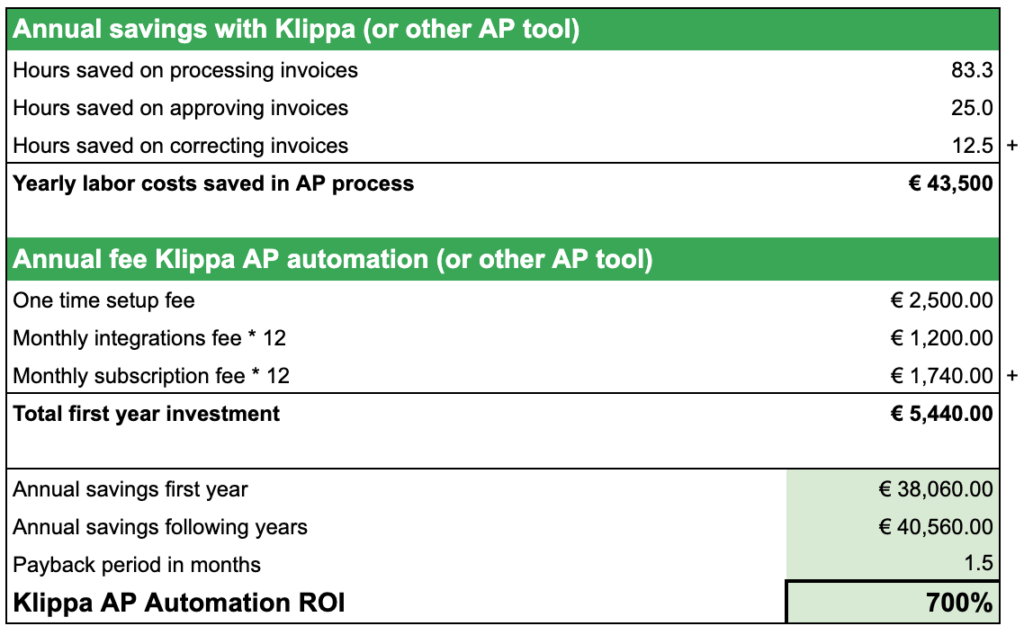
In this example, we look at a mid sized company processing 500 invoices per month. We assume a standard labor cost of 30 euros per hour, which includes salary, benefits, and overhead.
1. Calculate Labor Savings: A manual process typically allows an employee to handle 5 invoices per hour. Automation increases this speed to 30 invoices per hour.
- Manual Time: 100 hours per month.
- Automated Time: 17 hours per month.
- Monthly Savings: 83 hours.
2. Calculate Approval Efficiency: Approvers usually spend 6 minutes per manual invoice. Automation cuts this to 3 minutes.
- Manual Time: 50 hours per month.
- Automated Time: 25 hours per month.
- Monthly Savings: 25 hours.
3. Account for Error Correction: Roughly 10 percent of invoices require manual correction, taking 20 minutes each. Automation reduces this to a simple 5 minute check for vendor errors.
- Manual Correction Time: 17 hours per month.
- Automated Correction Time: 4 hours per month.
- Monthly Savings: 13 hours.
The Final Result: By adding these savings together, this business saves 121 hours per month. At 30 euros per hour, that is a total labor saving of 43,500 euros per year.
Implementation Costs and the Final ROI
To find your true return on investment, you must subtract the total cost of ownership from your annual savings. While many businesses only look at the monthly subscription, a complete ROI model includes setup fees and integration costs.
The Investment Breakdown
Using our example of a company processing 500 invoices per month, here is a typical first-year cost structure:
- Initial Setup and Integration: A one-time fee of 2,500 euros to connect the software to your existing ERP or accounting system.
- Monthly Subscription: Based on volume and user count, this averages 145 euros per month.
- Ongoing Integration Support: A monthly fee of 100 euros to ensure data remains synced across your business systems.
The Year One Calculation
- Total Annual Savings: 43,500 euros (Labor and productivity gains).
- Total First-Year Costs: 5,440 euros (Setup + Subscription + Integration).
- Net Profit from Automation: 38,060 euros.
Using the standard formula, this results in an ROI of 700 percent. This means that for every 1 euro you spend on AP automation, you receive 7 euros back in value during the first year.
Want to Run the Numbers Yourself?
Do you want to see the exact calculations? Or do you want to calculate the ROI for your specific situation?
Feel free to download our free template for ROI calculation on AP automation and try it out.
Get Started with AP Automation
Moving from a manual process to an automated one is a strategic investment in your company’s future. Klippa SpendControl is built to help you capture that 700 percent ROI while providing the security and transparency that modern finance leaders require. By moving your accounts payable to our platform, you gain access to benefits that go far beyond simple cost savings.
Strategic Benefits of Klippa SpendControl:
- Seamless ERP Integration: SpendControl is designed to work with your existing accounting software. This ensures that every invoice is captured, coded, and synced without manual intervention.
- Enhanced Fraud Protection: Our system acts as a constant security layer by using AI to flag duplicate invoices and verify vendor bank details before any payment is made.
- Instant Audit Readiness: You can replace physical filing cabinets with a permanent digital audit trail. This reduces the time your team spends on audit preparation from several weeks to just a few hours.
- Improved Employee Retention: By removing the mind-numbing task of manual data entry, you allow your finance team to focus on high-value work like cash flow forecasting and strategy.
If you’re ready to free your team from repetitive AP tasks and actually see a return on your investment, book a free demo with one of our specialists today. We’ll show you how Klippa SpendControl works and how it can deliver real results for your business.
FAQ
Most mid-sized businesses reach a break-even point within 6 to 8 months. By the end of the first year, once setup costs are covered and the team is fully trained, the ROI typically reaches the 700 percent mark.
Yes. Modern AP solutions are designed to integrate with major ERP and accounting systems like NetSuite, SAP, Xero, and Microsoft Dynamics. This ensures that your financial data remains synced without manual entry.
No. Automation is designed to remove the repetitive grunt work like data entry and manual filing. This allows your existing team to focus on higher-value tasks such as cash flow management, vendor negotiations, and fraud prevention.
Automation creates a permanent digital trail for every invoice, approval, and payment. Instead of searching through paper files, you can provide auditors with instant access to a complete history of your financial transactions.