

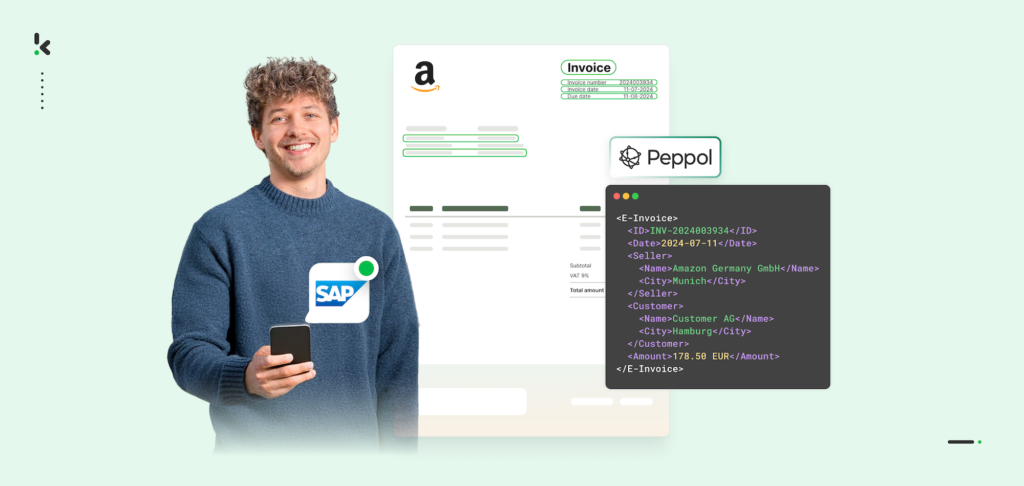
If your ERP system exports invoices as PDFs and your company trades internationally, compliance challenges are on the horizon. More countries are requiring machine-readable formats such as UBL or XML, meaning static PDFs are no longer accepted by many tax authorities and procurement portals.
For businesses using SAP, Oracle, or NetSuite, adapting to these rules can seem costly and disruptive. Full ERP migrations take months, require new training, and often cost millions. Yet relying on PDF-only outputs risks delayed payments, rejected invoices, and non-compliance penalties.
The solution is simpler than you think. By integrating an e-invoicing tool that automatically converts PDFs into globally compliant formats, you can keep your existing ERP workflows while meeting every mandate.
In this blog, we’ll explore why PDFs fall short, how to bridge the gap to UBL and Peppol, and how Klippa can help achieve smooth and scalable ERP e-invoicing.
Key Takeaways
- ERP e-invoicing enables SAP, Oracle, NetSuite, and other ERP systems to generate structured, compliant invoice formats like UBL or XML directly or via integration.
- PDF invoices do not meet global compliance requirements in many regions because they are not machine-readable or automatically validated.
- The right e-invoicing solution should offer ERP compatibility, multi-country support, automation, format flexibility, and continuous compliance updates.
- Integration is straightforward; output invoice data from your ERP and send it to the conversion service for real-time structured formatting.
- Benefits include cost savings, faster processing, assured compliance, improved data accuracy, scalability, and fraud prevention.
What is ERP E-Invoicing?
ERP e-invoicing is the process of generating, exchanging, and validating invoices directly within your enterprise resource planning system in a structured, machine-readable format. Instead of producing paper or static PDF files, the ERP creates electronic invoices using standards like UBL, XML, or EDI that can be automatically processed by trading partners, procurement platforms, and tax authorities.
By integrating e-invoicing into your ERP, you remove the need for manual data entry, reduce errors, and ensure real-time compliance with global regulations.
For example, when a sales order is completed in SAP, Oracle, or NetSuite, the e-invoicing system can automatically create a compliant invoice that meets the requirements of the buyer’s country, whether that is Peppol BIS in the EU, NLCIUS in the Netherlands, or similar frameworks in other regions.
ERP e-invoicing aligns your business with the global shift to digital-first transactions. It boosts visibility, speeds up payments, and keeps invoices compliant across borders. As global mandates grow, it is becoming essential for international trade and future readiness.
Why PDFs Don’t Meet Global Compliance
On the surface, PDF invoices seem convenient. They are easy to generate, simple to read, and can be sent to almost anyone. However, in the eyes of global tax authorities and procurement systems, PDFs fall short because they are not machine-readable.
Compliance portals cannot automatically extract data from a PDF without manual intervention, which defeats the purpose of digitizing invoicing in the first place.
Many countries now require invoices to be transmitted in structured electronic formats such as UBL, XML, or Factur-X. These formats are designed for automated processing, meaning every field in the invoice can be instantly validated against tax and procurement rules.
A PDF, even if it contains the same information, is effectively locked inside an image or text shell that machines cannot reliably interpret. This leads to failed submissions, payment delays, and potential fines.
The stakes are rising quickly as regional mandates accelerate. The European Union has endorsed the Peppol network for B2G and B2B transactions, while Belgium already requires this for all B2B and B2G transactions from January 2026.
Without converting PDFs into these compliant formats, your ERP-generated invoices risk becoming incompatible with the systems used by your trading partners and tax authorities. In short, PDFs may fulfill internal needs, but they cannot keep pace with the global shift toward fully automated, compliant e-invoicing.
How to Bridge the Gap: PDF to UBL/Peppol
If your ERP system exports invoices as PDFs, you do not have to overhaul your entire infrastructure to meet UBL or Peppol compliance.
The most effective approach is to add a conversion layer that transforms your PDFs into the required electronic formats automatically and in real time. This allows you to keep your existing ERP workflows while ensuring compatibility with global invoicing standards.
Step-by-step approach to bridging the gap:
1. Identify compliance requirements for each country
Research the mandates in your key markets. The EU’s Peppol BIS format or Germany’s X-Rechnung each have unique specifications. Knowing these requirements upfront ensures your conversion process produces the right output.
2. Map your ERP invoice structure
Determine what fields, metadata, and layout your SAP, Oracle, or NetSuite PDF exports contain. This mapping will help the conversion solution extract accurate data without any loss of information.
3. Implement an API that converts PDF to UBL/XML instantly
Solutions like Klippa DocHorizon’s API can take any ERP-generated PDF invoice, read its structure, and create a compliant UBL or XML version that matches regional mandates.
4. Automate invoice routing
Configure your ERP to send invoices directly to the conversion API when they are generated. This eliminates manual uploads or conversions, reducing delays and errors.
5. Maintain ongoing compliance updates
Global invoicing standards change frequently. Choose a provider that actively updates their conversion process so your business remains compliant without additional IT intervention.
By using a dedicated conversion solution rather than redesigning your ERP, you gain the ability to meet international e-invoicing standards quickly and with minimal disruption. You protect your existing workflows, avoid costly migration projects, and open the door to smooth cross-border transactions.
How to Integrate E-Invoicing into Your ERP
Integrating e-invoicing into your ERP is easier than most businesses expect when the right approach is taken. Instead of redesigning your entire system, you can leverage your ERP’s existing output capabilities and connect them to an API that automatically converts invoices to compliant formats for each market you trade in.
SAP Integration
SAP provides flexible output management tools that can be used to capture the invoice at the moment it is generated.
- Configure SAP Output Management to route invoices in PDF or XML format to the conversion API.
- The API transforms these invoices into UBL, Peppol BIS, or other mandated formats instantly.
- The compliant invoice can be sent directly to trading partners or B2G submission portals without manual work.
Oracle Integration
Oracle ERP Cloud and Oracle E-Business Suite both offer built-in output mechanisms.
- Use Oracle BI Publisher or XML Gateway to capture invoice output.
- Send the invoice file to the API for real-time conversion into structured, compliant formats.
- Route the converted file back into Oracle workflows for automatic submission to the relevant portal.
NetSuite Integration
NetSuite’s API capabilities make e-invoicing integration straightforward.
- Utilize SuiteTalk (SOAP) or REST API endpoints to send invoice data or exported PDFs to the conversion service.
- Receive the transformed invoice in UBL/XML and push it directly to customer systems or government portals.
Other ERPs
Systems like Microsoft Dynamics 365, Sage, JD Edwards, and Infor also support export functions that can be connected to a conversion API.
- Any ERP capable of generating invoices in a file format can be integrated using the same process: output > conversion API > compliant structured format > submission.
With this approach, your ERP’s role stays the same, and the e-invoicing solution acts as a compliance bridge. You avoid the complexity of a full ERP overhaul and gain the ability to meet global mandates instantly.
Benefits of Integrating E-Invoicing into Your ERP
Moving from PDF-only invoice outputs to integrated e-invoicing delivers far more than just compliance. It transforms invoicing into a faster, safer, and more cost-effective process that supports your entire business ecosystem.
Cost Savings
Avoiding a full ERP migration saves millions in licensing, implementation, and training costs. Automated e-invoicing also reduces paper, printing, and postage expenses, achieving savings of 60% to 80% compared to traditional invoicing processes.
Faster Invoice Processing
Invoices converted and sent in compliant formats can be validated and approved automatically by customers and tax portals. This shortens the payment cycle, improves cash flow, and reduces accounts receivable aging.
Compliance Assurance
Whether you are submitting invoices in Peppol BIS for the EU, Factur-X in France, or XML in Italy, integrated e-invoicing ensures every invoice meets the exact specifications of the relevant mandate. This minimizes the risk of rejected invoices and associated penalties.
Enhanced Data Accuracy
Using structured formats reduces human input errors and ensures that invoice data is consistent across systems, making reconciliation and auditing easier.
Scalability for International Trade
With multi-country mandate support, you can expand into new markets without IT disruption. Adding new formats or regions becomes a configuration task rather than a full development project.
Fraud Prevention and Security
Structured invoice formats can include built-in validation rules that detect inconsistencies or suspicious activity. Combined with security certifications such as ISO 27001 and GDPR compliance, your data remains protected.
Integrated e-invoicing turns your ERP into a global-ready compliance engine, enabling your business to trade seamlessly across borders while keeping operational costs under control.
How Klippa DocHorizon Can Help With E-Invoicing
Klippa DocHorizon offers an Intelligent Document Processing API engineered to solve the exact challenge many international companies face: ERP systems that export PDFs while the world demands structured formats like UBL or XML. With Klippa, you can keep your ERP workflows intact, avoid costly migrations, and achieve full compliance in every country you operate in.
How e-invoicing with Klippa works:
- Seamless ERP integration: Connect directly to SAP, Oracle NetSuite, Microsoft Dynamics, and other ERP platforms without redesigning your core systems.
- Real-time PDF-to-UBL/XML conversion: Instantly transform ERP-generated PDFs into formats accepted by Peppol, Factur-X, NLCIUS, and other global mandates.
- Automation built-in: Invoices are processed without manual intervention, reducing workload and error rates.
- Secure and certified: Fully compliant with ISO 27001, SOC 2, and GDPR standards to protect sensitive financial data.
Whether you are trading with government portals, large B2B customers, or new international partners, Klippa acts as the compliance and automation layer that your ERP is missing. It makes your invoicing process future-proof while leaving your current ERP investments untouched.
Want to know more? Get in contact with one of our experts or book a free demo below!
FAQ
Yes. Using SAP Output Management, you can route invoices directly to Klippa’s API for automatic conversion from PDF to compliant formats like UBL or XML. This process works alongside your existing SAP configuration and does not require a migration.
2. Does Klippa support Oracle ERP Cloud and Oracle E-Business Suite?
Absolutely. Oracle’s BI Publisher and XML Gateway functions can be configured to send invoice outputs to Klippa for real-time conversion. The compliant invoice is then returned and ready for delivery to customers or submission to government portals.
3. Is NetSuite compatible with Klippa’s e-invoicing API?
Yes. NetSuite integrates via SuiteTalk (SOAP) or REST APIs, allowing invoice data or PDF exports to be sent to Klippa for conversion into compliant formats without manual intervention.
4. Does Klippa handle different UBL variants for multiple countries?
Yes. Each country has its own UBL specifications, and Klippa’s system automatically applies the correct schema and validation rules for the destination country.
5. Can Klippa manage both B2G and B2B invoicing requirements?
Yes. From Peppol submissions for government transactions to XML and JSON formats for private-sector partners, Klippa covers both.
6. Will the solution adapt to new invoicing mandates?
Yes. Klippa updates its compliance rules continuously to reflect changing regulations in over 80 countries, ensuring your invoices remain valid and accepted.
7. How secure is the e-invoicing process with Klippa?
Klippa meets top-tier security standards such as ISO 27001, SOC 2, and GDPR compliance, ensuring your sensitive financial data remains protected.
8. Can Klippa integrate with ERPs besides SAP, Oracle, and NetSuite?
Yes. Klippa supports any ERP capable of exporting invoices in PDF, XML, CSV, or similar formats, including Microsoft Dynamics, Sage, JD Edwards, Infor, and others.