

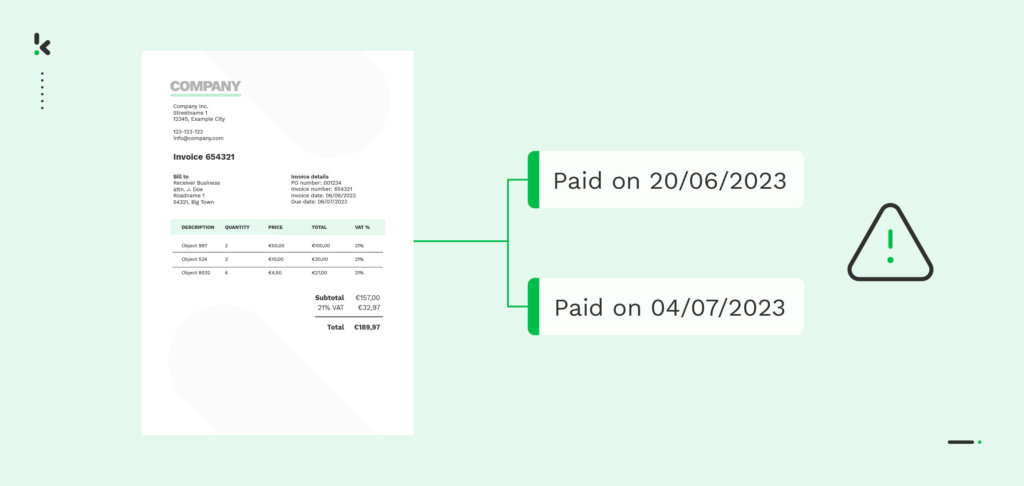
Duplicate payments are one of the most common and costly AP errors. With the right automated detection workflow, you can find existing duplicates in minutes and stop them from ever happening again using Intelligent Document Processing (IDP).
An unnoticed extra payment drains cash, distorts financial reporting, and damages vendor relationships. Recent industry data from SAP Concur shows that the average duplication rate is 1.29%, with the average duplicate invoice costing a business $2,034. This problem is often hidden in accounts payable workflows and grows worse without a structured fix.
In this guide, we will walk you through how to detect duplicates quickly, recover overpayments, and use IDP automation to protect your business from future errors. The focus is on actionable steps you can implement immediately, supported by proven AP controls and automation strategies.
Key Takeaways
- Duplicate payments hide in common AP processes and can be detected with automated tools
- Historical audits and vendor reconciliation help recover lost funds
- IDP automation improves accuracy with OCR, smart matching, and duplicate detection
- Clear AP controls and standardized workflows prevent duplicates from happening again
Detecting Duplicate Payments Already in Your System
Before you can prevent duplicate payments in the future, you need to find and fix the ones already in your accounts payable records.
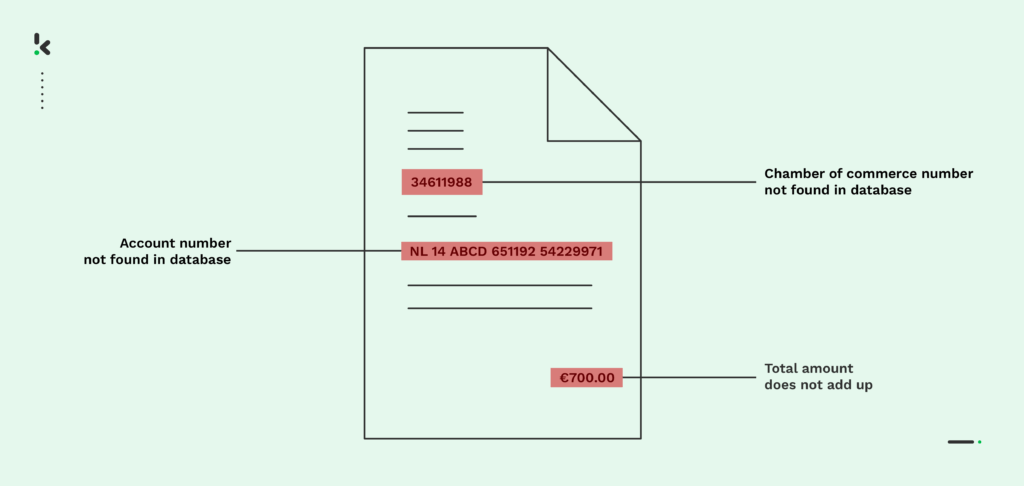
Duplicate payments often slip through for months or even years without being noticed. They may hide under slightly different invoice numbers, mismatched vendor names, or repeated amounts. The fastest way to uncover them is to use automation for data analysis, then confirm results with human review.
Step 1 – Run Historical Audits with AP Automation Tools
- Use your AP or IDP system’s search and report functions to scan past payment runs.
- Look for repeated invoice numbers, identical amounts, matching payment dates, or duplicate vendor IDs.
- Flag all potential duplicates for further investigation before action is taken.
Step 2 – Reconcile with Vendor Statements
- Request up-to-date transaction statements from all major suppliers.
- Match each vendor’s records against your AP ledger.
- Confirm any duplicate entries by cross-checking invoice copies and payment details.
- Initiate recovery by requesting repayment or a credit note for verified duplicates.
Step 3 – Clean Your Vendor Master File
- Remove duplicate vendor entries and unify naming conventions. For example, “ABC Ltd” and “ABC Limited” should be combined into one clean record.
- Standardize vendor data formats so the system can identify matches accurately.
- Use IDP’s vendor data cleansing features to detect and merge duplicates in real time.
With these steps complete, your AP data will be cleaner and more reliable. You will have a clear picture of duplicates that have already occurred and the amount recovered. This is the foundation for putting strong prevention measures in place so you never repeat the same errors.
Preventing Duplicate Payments Going Forward
Once you have cleaned your accounts payable records, the next step is to put strong, automated controls in place to ensure duplicate payments cannot slip through again.
Without prevention measures, duplicates will continue to appear over time. Intelligent Document Processing (IDP) provides the automation and data accuracy needed to detect and block duplicates before payment, while standardized AP workflows keep your processes consistent.
Step 1 – Centralize Invoice Intake
- Direct all invoices, both paper and digital, to one single intake point.
- Use an AP email inbox or supplier portal for consistent processing.
- Apply OCR and Natural Language Processing (NLP) in your IDP tool to capture all invoice data accurately at intake.
Step 2 – Automate Matching and Verification
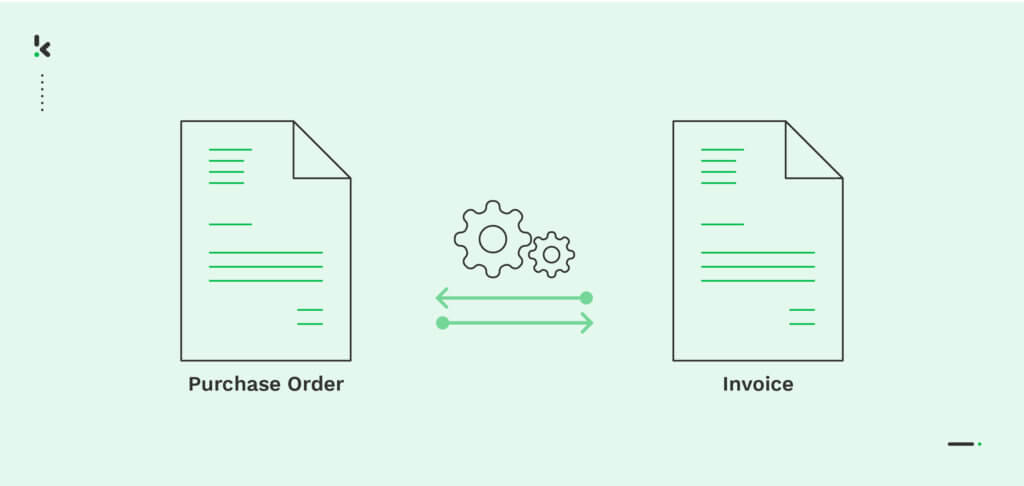
- Configure your IDP solution for two-way matching (invoice vs purchase order) and three-way matching (invoice vs purchase order vs goods receipt).
- Flag mismatched amounts, missing items, or duplicate invoice numbers for review before payment.
Step 3 – Implement Real-Time Duplicate Detection Rules
- Enable your AP automation system to scan every incoming invoice for repeated vendor details, transaction dates, amounts, or line items.
- Create an approval hold for all flagged invoices until confirmed by a human reviewer.
Step 4 – Standardize Your Accounts Payable Workflow
- Develop one clear AP process for all invoices.
- Define approval hierarchies and segregate duties so no single employee can both input and approve a payment.
- Train staff to follow these rules without exception.
Step 5 – Limit Payment Methods
- Transition from paper checks to secure electronic methods such as ACH transfers or virtual cards.
- Electronic payments provide better tracking and reduce the risk of reissued, duplicated payments.
By combining these process controls with IDP automation, your AP operations become more transparent, faster, and far less prone to costly errors.
How IDP Technology Enables This
Intelligent Document Processing combines OCR, AI matching, and real-time data validation to catch duplicate payments before they happen and keep your accounts payable workflow fully accurate.
IDP replaces error-prone manual processes with automation designed to identify irregularities quickly and reliably. By integrating into your AP system, it checks every invoice against your existing records, purchase orders, and receipts, ensuring no duplicate slips through unnoticed.
Key IDP Features for Duplicate Prevention
Automated Data Extraction (OCR + NLP)
Accurately captures data from invoices, receipts, and purchase orders without manual typing. This eliminates the entry errors that often cause duplicate payments.
Smart Matching
Performs automated two-way and three-way matching to compare invoice data with purchase orders and goods receipts. Discrepancies, such as mismatched item quantities or amounts, are flagged immediately.
Duplicate Detection
Scans for duplicate invoice numbers, matching amounts, identical vendor IDs, and repeated transaction dates across incoming invoices and past payment runs.
Vendor Master Data Cleansing
Identifies and merges duplicate vendor records to keep your vendor database consistently accurate, improving matching accuracy across the AP workflow.
Centralized Audit Trail
Creates a single, auditable record for every document and payment transaction. This makes it possible to track how duplicates were caught and resolved, improving compliance and financial reporting.
By leveraging these capabilities, your AP team can move from reactive detection to proactive prevention. IDP ensures that every invoice processed is legitimate, accurate, and unique before approval.
Checklist to Stay Duplicate-Free
Use this checklist to keep your accounts payable process free from duplicate payments and maintain complete accuracy in your financial records.
Detection and Recovery
- Run quarterly audits using your AP or IDP automation tools
- Reconcile AP records against vendor statements
- Confirm duplicates with invoice copies before requesting repayment or credit notes
Prevention Controls
- Centralize all invoice intake into one email or supplier portal
- Use OCR and NLP to capture data accurately at intake
- Automate two-way and three-way matching before payment approval
- Activate real-time duplicate detection rules in your AP system
- Clean and standardize your vendor master data regularly
Workflow and Compliance
- Define one standardized AP workflow for all invoices
- Enforce segregation of duties between data entry and payment approval
- Train AP staff on duplicate prevention policies
- Limit payment methods to secure electronic transfers with clear tracking
- Maintain a centralized audit trail of all invoices and payments
Following this checklist ensures duplicates are detected early and prevented consistently, giving your business cleaner data, better vendor relationships, and stronger cash flow control.
Automate Duplicate Payment Detection with Doxis
In accounts payable, precision is everything. Duplicate payments are costly, time-consuming to fix, and damaging to vendor trust. Doxis’ AI.dp and SpendControl are designed to remove these risks completely, giving you a faster, safer, and more reliable way to process payments.
AI.dp uses advanced AI technology, including image hashing, entity matching, and industry-leading OCR, to capture invoice data with exceptional accuracy. Every document is scanned for hidden duplicates or signs of forgery, and the system provides instant feedback on potential fraud detection. This ensures that only legitimate, unique transactions move forward for approval.
SpendControl acts as a continuous protection layer in your AP workflow. Whether your process is automated or manual, it runs regular checks to identify errors, duplicate invoices, and repeated vendor payments before they are processed. Its proactive monitoring keeps your financial records clean and ensures financial health is maintained at all times.
With Doxis, duplicate payment detection is not an afterthought — it is built into every step of the workflow. From document capture to final payment, each invoice is verified, matched, and approved only once.
Ready to take control of your AP process?
Book a free demo today or speak to our experts to see how Doxis’ solutions can help you detect, recover, and prevent duplicate payments with complete confidence.
FAQ
Duplicate payments often result from manual data entry errors, invoice fraud, multiple submission channels, poor approval workflows, or missing records during system changes.
Yes. AP automation and Intelligent Document Processing (IDP) reduce human error, perform automated matching, flag suspicious documents, and detect duplicates before a payment is processed.
IDP uses OCR (Optical Character Recognition) and NLP (Natural Language Processing) to capture invoice data accurately, applies two-way and three-way matching to identify discrepancies, and checks for repeated vendor information, amounts, and invoice numbers across the system.
AI.dp combines OCR accuracy with image hashing, entity matching, and AI-driven fraud detection. It scans all incoming invoices for similarities or signs of manipulation, preventing duplicates from slipping through your AP workflow.
SpendControl is a continuous monitoring solution that checks for errors, duplicate invoices, and repeated vendor payments in both manual and automated AP processes, helping maintain clean records and healthy cash flow.
With industry-leading accuracy, seamless integration, and proactive detection features, Doxis delivers clear ROI by preventing costly overpayments and reducing audit workloads.